
Alletec Logo
  • Solutions & Services
    • AI Business Applications
    • Enterprise Data Services
    • Cloud & AI Platform
    • Services
    • Partner Services
    • Security
    Microsoft Dynamics 365Microsoft Dynamics 365Power PlatformPower Platform
    • BusinessCentralBusiness Central
    • SalesSales
    • FinanceFinance
    • Customer InsightsCustomer Insights | Marketing
    • Supply Chain ManagementSupply Chain Management
    • Customer ServiceCustomer Service
    • Project OperationsProject Operations
    • Field ServiceField Service
    • Human ResourcesHuman Resources
    • Contact CenterContact Center
    • Power BIPower BI
    • Power AppsPower Apps
    • Power AutomatePower Automate
    • Power PagesPower Pages
    Microsoft AzureData Engineering & Modern Data Platforms
     
    • Modern Data PlatformsModern Data Platforms
    • Data EngineeringData Engineering
    • Data Governance & QualityData Governance & Quality
    • Analytics & InsightsAnalytics & Insights
      • Power BIPower BI
      • Power AppsPower Apps
      • Power AutomatePower Automate
      • Power PagesPower Pages
      Microsoft AzureMicrosoft AzureData & AIData & AI
      • Cloud Architecture & ConsultingCloud Architecture & Consulting
      • Managed ServicesManaged Services
      • Data EngineeringData Engineering
      • Microsoft FabricData Fabric
      • AI Powered SolutionsAI-Powered Solutions
      • RPARobotic Process Automation (RPA)
      • Modern Data PlatformsModern Data Platforms
      • Data EngineeringData Engineering
      • Data Governance & QualityData Governance & Quality
      • Analytics & InsightsAnalytics & Insights
      • Cloud Architecture & ConsultingCloud Architecture & Consulting
      • Managed ServicesManaged Services
        • Data EngineeringData Engineering
        • Microsoft FabricData Fabric
        • AI Powered SolutionsAI-Powered Solutions
        • RPARobotic Process Automation (RPA)
        • AIMAIM Modernization Center
        • NAVD365 Business Central | NAV
        • Upgrade Nav to BCUpgrade NAV to D365 Business Central
        • Customer EngagementD365 Customer Engagement Services
        • Applications ModernizationApplications Modernization
        • GP to BCGP To D365 BC Migration
        • SharePointSharePoint Solutions
        • Data EngineeringData Engineering
        • Microsoft FabricMicrosoft Fabric
        • Applications ModernizationApplications Modernization
        • RPARobotic Process Automation (RPA)
        • AI PoweredAI-Powered Solutions
        • AIM Modernization CenterAIM Modernization Center
        • MasterVARMasterVAR
        • CybersecurityCybersecurity Solutions
      • Copilot & AI Agents
      • Industries
        • Professional Services
        • Manufacturing
        • Education
        • Trade & Distribution
        • Financial Services
        • Retail & Digital Commerce
        • Travel
        • Food & Beverages
          • Bakery
          • Beverages
          • Confectionary
          • Dairy
          • Fresh Produce
          • Frozen & Packaged Food
          • Meat & Poultry
          • Sauces & Dressings
          • Snacks
          • Spices
      • Products
        • Industry Solutions
        • Dynamics 365 Accelerators
        • Travel 365Travel 365
        • EdTech 365EdTech 365
        • Smart-CXSmart-CX
        • BAFINSBAFINS
        • EPC 365EPC 365
        • XtendedWMSXtendedWMS
        • socialRelaySocialRelay
        • ProActivateProActivate
        • CyborgCyborg
        • P2P 365P2P 365
      • Resources
        • Alletec Blog
        • Videos
        • Case Studies
        • Brochures
        • eBooks & Infographics
      • Alletec
        • Company Profile
        • Board of Directors
        • Investor Relations
        • Life @ Alletec
        • Careers
        • Contact Us
      Great Place to work Alletec
      Blog

      Business Central October 2018 Release Overview

      AlletecAlletec

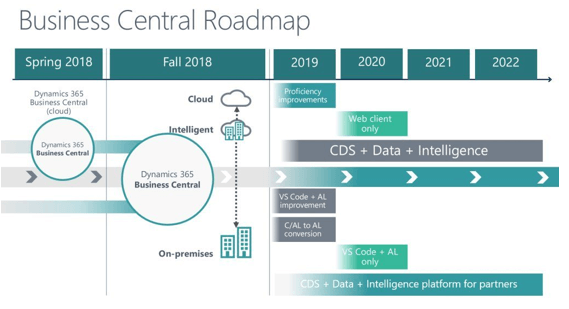
      Microsoft’s ERP offering for the SMB segment called Dynamics NAV has been historically available to customers in an on-premise deployment mode. Customers have had the option to host it either in their on-premise infrastructure or some third party cloud infrastructure. Keeping in line with its vision of Cloud First, Microsoft launched SAAS based Business Central bringing Dynamics NAV to cloud.

      Till now Dynamics Business Central was available on cloud only. With the October 2018 release an on-premise offering of Business Central is also available. Dynamics NAV customers can now upgrade to Business Central on premise, move to the cloud, or adopt a hybrid approach. We have listed down few Business Central features from the latest October 2018 release.

      • On Cloud, Hybrid & On-Premises Availability: With October 2018 release Dynamics NAV transitioned to Business Central on Premise. Business Central is no longer a “cloud-only” application. With NAV’s inclusion, Business Central will also be available as on-premise and hybrid implementations. The transition for a customer is highly smooth and seamless. With the new upgrade, Business Central will have the same UI and Ease of Use across all platform regardless of deployment mode. With Business Central Hybrid deployment, customers will be able to use Business Central from on-premise deployment while a tenant is being replicated on the cloud. At any time, they can switch to cloud or recover data from the cloud in case of disaster.
      • Access from Anywhere: Customers can access Dynamics 365 Business Central using Windows 10, iOS & Android apps. Bringing Digital Transformation to your business, it allows customers to be connected with the businesses at all times.

       The application is available on:

      • Windows 10 (desktop, tablet and phone)
      • Android (tablet and phone)
      • iOS (tablet and phone)
      • Enhanced user experience – Business Central users get a further streamlined, refreshed and modern user experience with many improvements helping customers to become more productive while simplifying learning curve to new users. 
        • Improved keyboard navigation and shortcuts: Get a mouse-free experience with a variety of keyboard shortcut combinations, including the Alt+F3 shortcut to filter the current value. Customers can navigate through cells and create filters using keyboard shortcuts. Use F8 shortcut that copies the cell above. New update has also implemented industry-standard shortcuts of Ctrl C & Ctrl
        • Enhanced Search: New enhanced search lets customers find what they want, in a much easier way. The search algorithm has been improved, now the result page offers the additional abstract of the result to understand it better. The Search field has been replaced with Search for Page or Report field. Customers can not only use it to find objects such as pages and reports, but also to find actions and product documentation.
        • Fresh UI: Microsoft has come out with a new user interface which is easier to use, simple & intuitive. The new layout focuses on utilizing more screen space with better visibility while providing easier navigation to the entire platform.
      • New Features to Improve Productivity:
        • Advanced filtering – The filter pane allows customers to create custom filters to get better and faster results. Business Central remembers the filters you applied throughout the session and allows the customers to:
          • Get an overview of the currently applied filters, and see if they were set by user or application.
          • Use lookups or the field’s data type to specify filter values
          • Create complex filters using operators, ranges & variables.
        • Limit Totals: With this release, Business Central gives customers control to apply filters to one or more dimensions that influence computed values.
        • Scalable Grids: Grids have become more scalable to accommodate larger sets of business data. In order to improve efficiency, the new grid allows customers to copy and paste data using industry standard shortcuts of Ctrl C and Ctrl V. Customers can also copy data to the clipboard to use it in other softwares (MS Excel, Outlook etc.). Based on customer’s demand new grids can be scaled to add more rows and columns.
        • Permission Sets Are Editable: In Business Central October Release, the Permission Sets can be created, modified and indented.
      • Enhanced Power BI Embed Experience: New Power BI tools are embedded within the Business Central Application. Improvements include:
        • Automatic deployment of Power BI reports
        • Default report selection
        • Manage Power BI reports from the Business Central dashboard.

      Power BI reports will be automatically deployed and selected when customers sign in for the first time. Customers can also customize and edit the integrated Power BI reports.

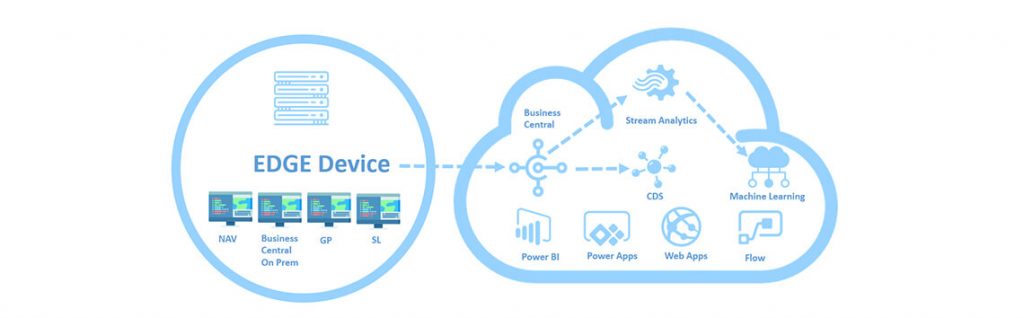
      • Intelligent edge for Dynamics GP, Dynamics SL, and Dynamics NAV: leveraging its PAAS and hybrid cloud capabilities, Microsoft is empowering on-premise customers to take full advantage of cloud-based solutions. With intelligent edge, customers can seamlessly connect their on-premises Dynamics SMB solution to the cloud and get access to Power BI, machine learning, Microsoft Flow, PowerApps and other. Microsoft securely replicates customer’s on-premises data to the cloud and deliver back actionable analysis and content. The intelligent cloud leverages solutions such as Power BI, PowerApps, Flow, and AI to provide insights and actionable messages enabling the customer to run their businesses even better.
      New Markets: With October 2018 release, Localised version of Business Central is available for three new markets.

      • Iceland
      • Norway
      • Mexico
      Let's Build Smarter, Agile, and Scalable Solutions Together
      Talk to An Expert
      Talk to An Expert Alletec
      Oct 30, 2018 17433 Views

      Recent Posts

      Dynamics 365 Project Operations for Professional Services: 5 Ways to Simplify Project Expense Management

      Jan 27, 2026

      Dynamics 365 Project Operations for Professional Services: 5 Ways to Simplify Project Expense Management
      Read Full Blog    
      Decoding Microsoft’s New IQ Layer: Work IQ, Fabric IQ, and Foundry IQ Explained

      Jan 13, 2026

      Decoding Microsoft’s New IQ Layer: Work IQ, Fabric IQ, and Foundry IQ Explained
      Read Full Blog    
      5 Cybersecurity Mistakes Your Business Cannot Afford in 2026

      Jan 9, 2026

      5 Cybersecurity Mistakes Your Business Cannot Afford in 2026
      Read Full Blog    

      Alletec blends deep Microsoft solutions expertise with industry knowledge and 25+ years of experience to catalyse digital transformation and amplify business outcomes for enterprises.

      FOLLOW US
      LATEST NEWS
      • Alletec recognized as 2025/26 Inner Circle Winner for Microsoft AI Business Solutions
      • From Copilot to Sustainability: Alletec to Lead Expert Discussions at Directions ASIA 2025
      • Alletec Strengthens North American Footprint with Major Microsoft Dynamics 365 Contact Center Win
      • Alletec Expands to the Middle East with a Subsidiary in Dubai
      • Alletec Named a Great Place to Work® for the Third Consecutive Year
      CONTACT US
      • India: A-1, Sector - 58 Noida - 201 301, India +91 120 3000 300

      • USA: 5605 North MacArthur Blvd., Ste 1000, Irving, Texas 75038 +1 469 767 9753

      • Kenya: The Westwood Vale Close Off Ring Road Westland +254 725 074 589

      • Canada: 181 Bay Street, #1800, Toronto, Ontario, M5J 2T9 +1 289 763 5998

      • United Arab Emirates: IFZA Business Park, DDP, PO Box 342001, Dubai +971 58 248 0169

      • info@alletec.com
      Quick Links
      • eBooks
      • Blogs
      • Case Studies
      • Brochures
      • Life At Alletec
      • Company Profile
      • Partner Program
      • Privacy Policy

      @ 2026 Alletec. All rights reserved.

      Chatbot IconAsk me anything