Alletec Logo
  • Solutions & Services
    • AI Business Applications
    • Enterprise Data Services
    • Cloud & AI Platform
    • Services
    • Partner Services
    • Security
    Microsoft Dynamics 365Microsoft Dynamics 365Power PlatformPower Platform
    • BusinessCentralBusiness Central
    • SalesSales
    • FinanceFinance
    • Customer InsightsCustomer Insights | Marketing
    • Supply Chain ManagementSupply Chain Management
    • Customer ServiceCustomer Service
    • Project OperationsProject Operations
    • Field ServiceField Service
    • Human ResourcesHuman Resources
    • Contact CenterContact Center
    • Power BIPower BI
    • Power AppsPower Apps
    • Power AutomatePower Automate
    • Power PagesPower Pages
    Microsoft AzureData Engineering & Modern Data Platforms
     
    • Modern Data PlatformsModern Data Platforms
    • Data EngineeringData Engineering
    • Data Governance & QualityData Governance & Quality
    • Analytics & InsightsAnalytics & Insights
      • Power BIPower BI
      • Power AppsPower Apps
      • Power AutomatePower Automate
      • Power PagesPower Pages
      Microsoft AzureMicrosoft AzureData & AIData & AI
      • Cloud Architecture & ConsultingCloud Architecture & Consulting
      • Managed ServicesManaged Services
      • Data EngineeringData Engineering
      • Microsoft FabricData Fabric
      • AI Powered SolutionsAI-Powered Solutions
      • RPARobotic Process Automation (RPA)
      • Modern Data PlatformsModern Data Platforms
      • Data EngineeringData Engineering
      • Data Governance & QualityData Governance & Quality
      • Analytics & InsightsAnalytics & Insights
      • Cloud Architecture & ConsultingCloud Architecture & Consulting
      • Managed ServicesManaged Services
        • Data EngineeringData Engineering
        • Microsoft FabricData Fabric
        • AI Powered SolutionsAI-Powered Solutions
        • RPARobotic Process Automation (RPA)
        • AIMAIM Modernization Center
        • NAVD365 Business Central | NAV
        • Upgrade Nav to BCUpgrade NAV to D365 Business Central
        • Customer EngagementD365 Customer Engagement Services
        • Applications ModernizationApplications Modernization
        • GP to BCGP To D365 BC Migration
        • SharePointSharePoint Solutions
        • Data EngineeringData Engineering
        • Microsoft FabricMicrosoft Fabric
        • Applications ModernizationApplications Modernization
        • RPARobotic Process Automation (RPA)
        • AI PoweredAI-Powered Solutions
        • AIM Modernization CenterAIM Modernization Center
        • MasterVARMasterVAR
        • CybersecurityCybersecurity Solutions
      • Copilot & AI Agents
      • Industries
        • Professional Services
        • Manufacturing
        • Education
        • Trade & Distribution
        • Financial Services
        • Retail & Digital Commerce
        • Travel
        • Food & Beverages
          • Bakery
          • Beverages
          • Confectionary
          • Dairy
          • Fresh Produce
          • Frozen & Packaged Food
          • Meat & Poultry
          • Sauces & Dressings
          • Snacks
          • Spices
      • Products
        • Industry Solutions
        • Dynamics 365 Accelerators
        • Travel 365Travel 365
        • EdTech 365EdTech 365
        • Smart-CXSmart-CX
        • BAFINSBAFINS
        • EPC 365EPC 365
        • XtendedWMSXtendedWMS
        • socialRelaySocialRelay
        • ProActivateProActivate
        • CyborgCyborg
        • P2P 365P2P 365
      • Resources
        • Alletec Blog
        • Videos
        • Case Studies
        • Brochures
        • eBooks & Infographics
      • Alletec
        • Company Profile
        • Board of Directors
        • Investor Relations
        • Life @ Alletec
        • Careers
        • Contact Us
      Great Place to work Alletec
      Blog

      NAV 2018- Image Analyzer in Action

      AlletecAlletec

      In Dynamics NAV 2018, the computer vision API is now embedded and available for consumption on the Item and Contacts card. The Image Analyzer extension uses the Computer Vision API from Microsoft Cognitive Services to identify attributes in images attached to Items.

      To start with, we need to have the Computer Vision API, either as a free trial or in the Azure portal if we have an Azure subscription. Once we have the Computer Vision API, we are ready to start analyzing pictures from the Item or Contact cards in Dynamics NAV 2018.

      We can analyze items to a certain limit during a specific period. Image Analyzer runs each time when we import an item or contact. After import, we can see the attributes, confidence level of an image that we have selected.

      Requirements

      There are a few requirements for the images:

      • Image formats: JPEG, PNG, GIF, BMP
      • Maximum file size: Less than 4 MB
      • Image dimensions: Greater than 50 x 50 pixels

      How to enable Image Analyzer

      There are two ways to activate Image Analyzer in Dynamics NAV 2018.

      1. Before importing an Image to Items or Contacts.
      2. After importing an Image to Items or Contacts.

      1. Before importing an Image

      To enable the Image Analyzer extension, perform below mentioned steps:

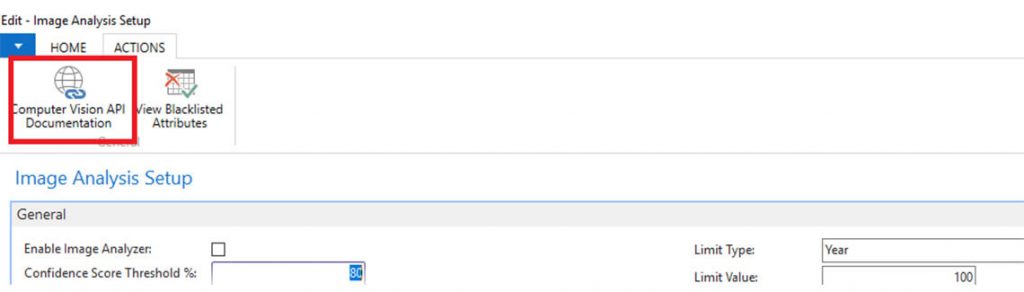
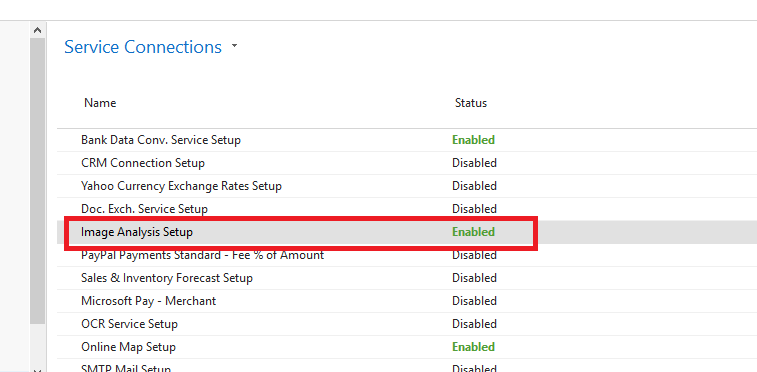
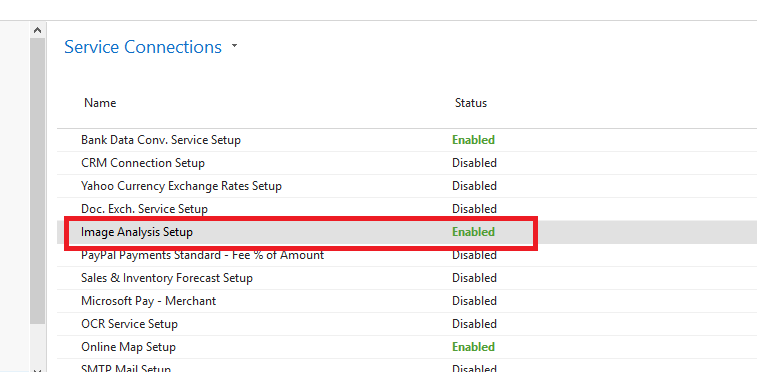
      • Open Service Connections, and then choose Image Analysis Setup. Choose the Enable Image Analyzer check box and then complete the steps in the assisted setup. 
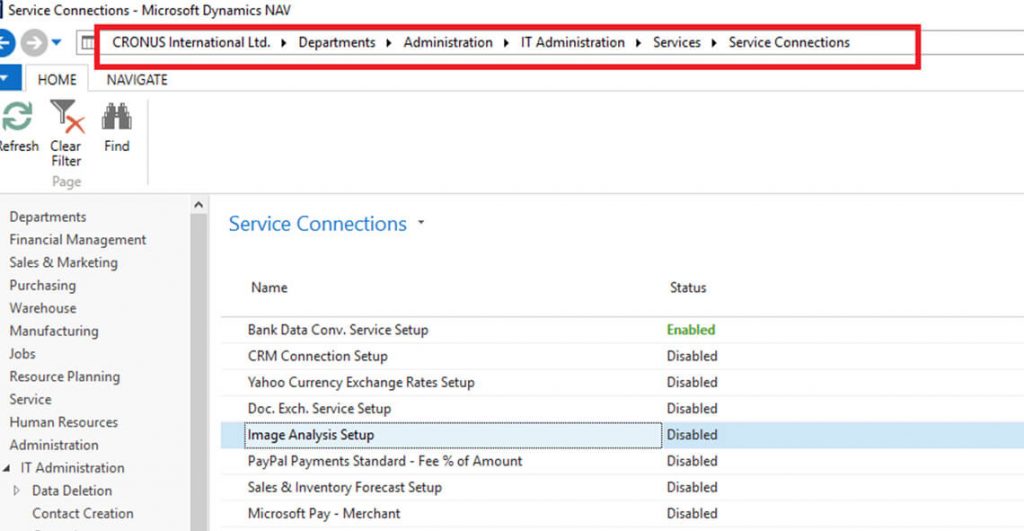
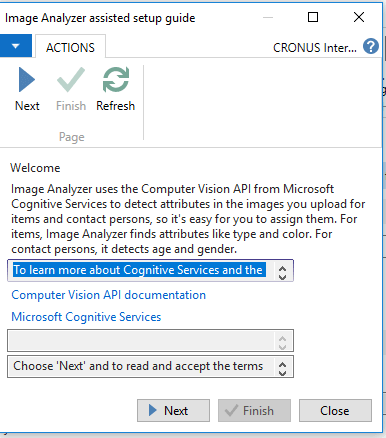
      Select Next
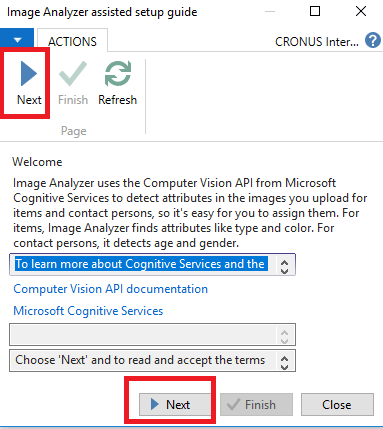
      Select next after accepting the Terms:
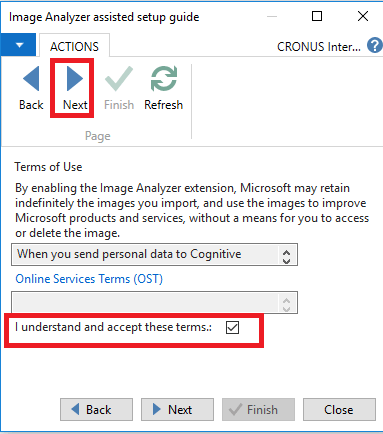
       

      For URL and Key, Click on Computer Vision API Documentation
      Status of Image Analysis Setup on Service Connections has been successfully enabled as shown in the below screen shot:
      2. After importing an Image:

      It might be possible that there are some items or contacts on which images are already imported before activating Image Analyzer. In this case, we can activate Image Analyzer from Item card page. When we click on particular item, we will get notification as shown in the following screen and we just need to enable it.
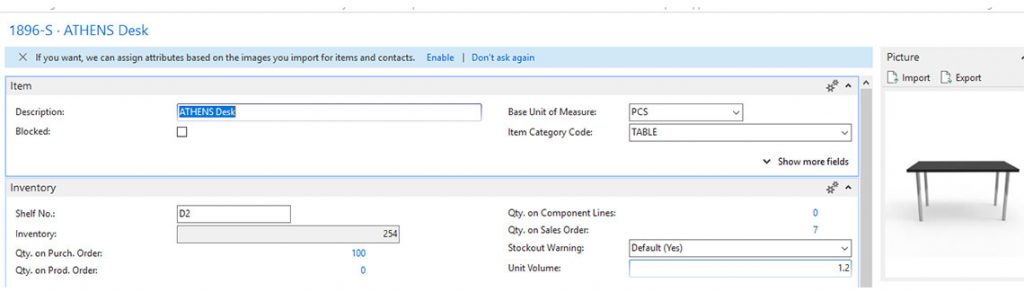
      Then, system will lead through enabling wizard same as we get in the service connection setup. We need to perform the same steps.
      Status of Image Analysis Setup on Service Connections has been successfully enabled as shown in the below screen shot:
      To analyze an image of an item

      The following steps describe how to analyze an image:

      • Select Items, and then choose the related link.
      • Upload an image to the item if it is not uploaded.
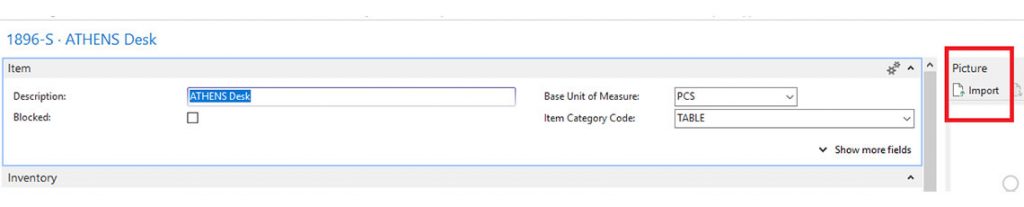
      • Import the below picture.

      • System will import picture on Item and it will appear in the right side of the item card.
      • Click on Analyze Picture on Actions tab.
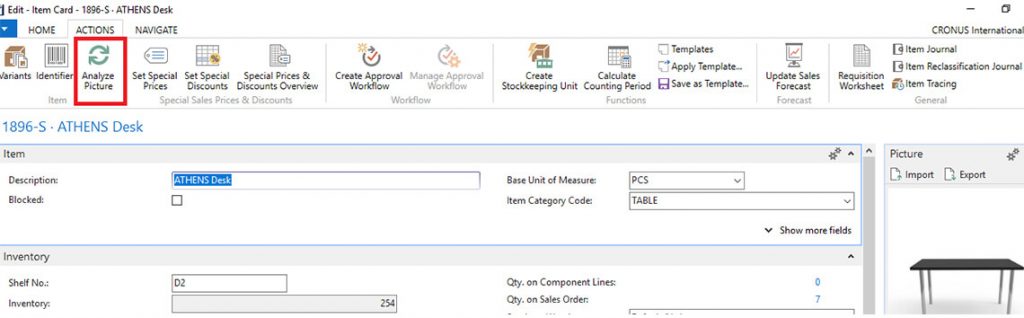
      • As soon as we click on this button, system will analyze the Image and suggest with attributes.
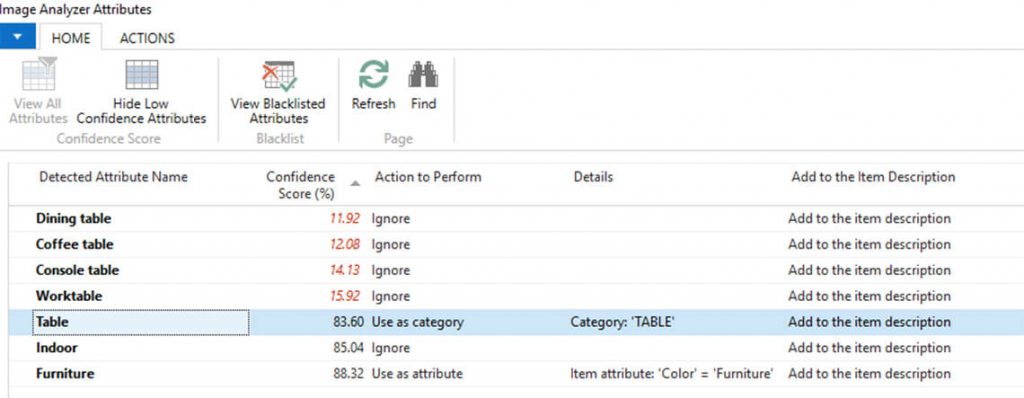
      • The Image Analyzer Attributes page displays the detected attributes, the confidence level, and other details about the attribute. We can use the ‘Action to perform’ options to specify what to do with the attribute.
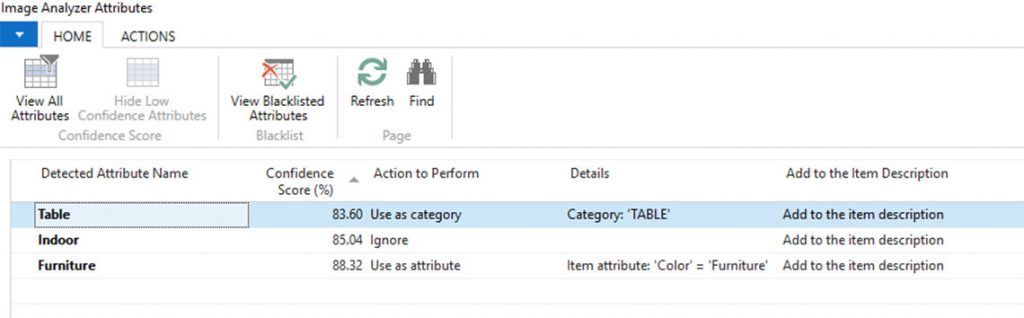
      • We can find all detected attributes if we click on a View All Attributes.
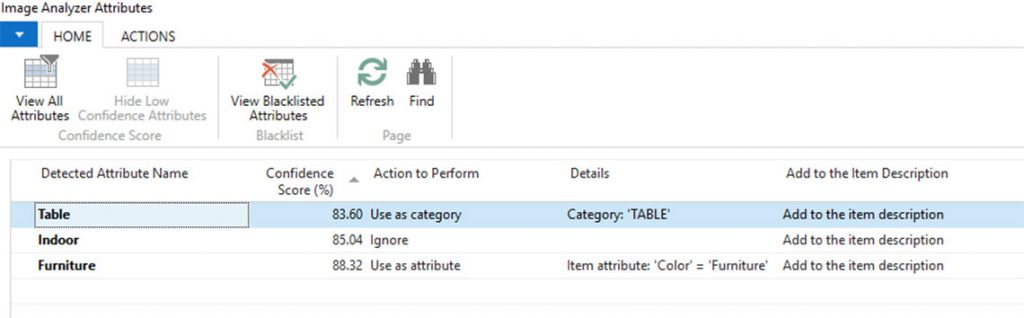
      • Image Analyzer page will display all the detected attributes. Attributes which are low confidence score will be displayed in Red.
      To analyze an image of Contact

      The following steps describe how to analyze an image:

      • Select Contact, and then choose the related link.
      • Upload an image to the item if it is not uploaded.
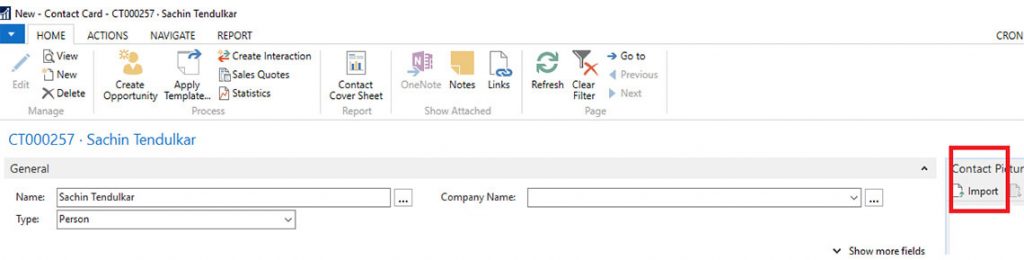
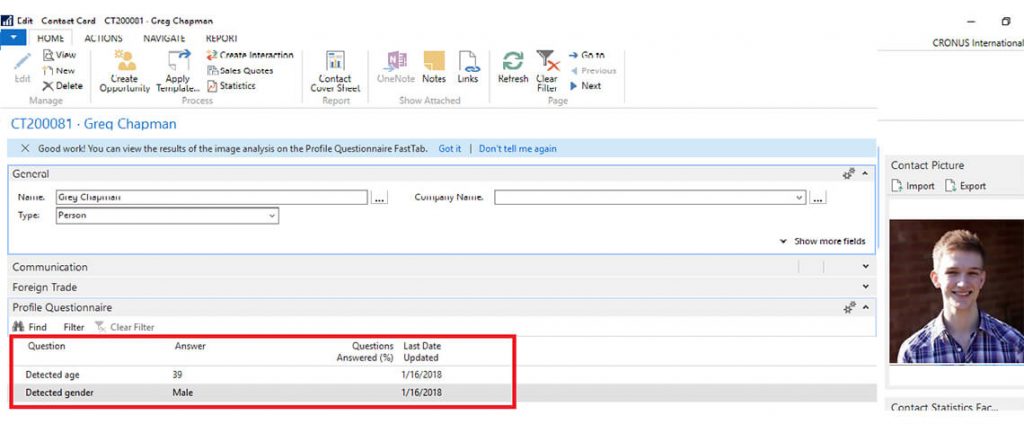
      System will display notification on the contact card as shown in the below screenshot:
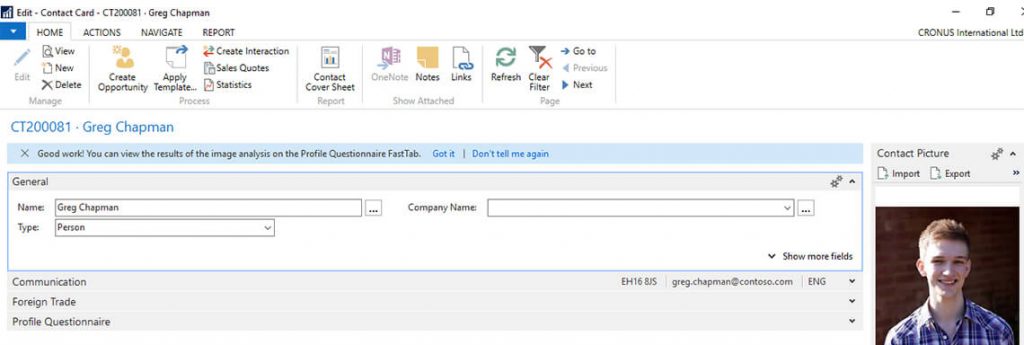
      • System shows the result of image analysis on the Profile Questionnaire fast tab.
      • Image Analyzer detect contact person’s gender and age.
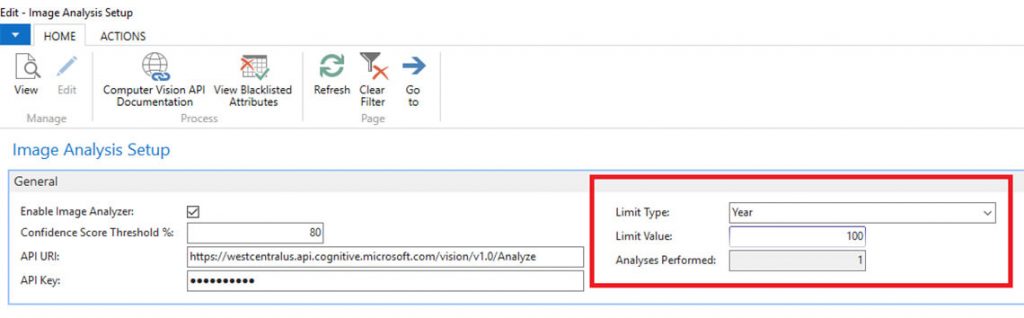
      How many analysis left in the current period

      We can view the number of analyses done so far, and how many left in the current period.

      • Choose Image Analyzer Setup, and then choose the related link.
      • The Limit type, Limit value, and Analyzes performedprovide the usage information.
      To stop using the Image Analyzer extension

      • Choose Service Connections, and then choose Image Analyzer Setup.
      • Clear the Enable Image Analyzercheck box

      Let's Build Smarter, Agile, and Scalable Solutions Together
      Talk to An Expert
      Talk to An Expert Alletec
      Jan 17, 2018 4079 views

      Recent Posts

      Dynamics 365 Project Operations for Professional Services: 5 Ways to Simplify Project Expense Management

      Jan 27, 2026

      Dynamics 365 Project Operations for Professional Services: 5 Ways to Simplify Project Expense Management
      Read Full Blog    
      Decoding Microsoft’s New IQ Layer: Work IQ, Fabric IQ, and Foundry IQ Explained

      Jan 13, 2026

      Decoding Microsoft’s New IQ Layer: Work IQ, Fabric IQ, and Foundry IQ Explained
      Read Full Blog    
      5 Cybersecurity Mistakes Your Business Cannot Afford in 2026

      Jan 9, 2026

      5 Cybersecurity Mistakes Your Business Cannot Afford in 2026
      Read Full Blog    

      Alletec blends deep Microsoft solutions expertise with industry knowledge and 25+ years of experience to catalyse digital transformation and amplify business outcomes for enterprises.

      FOLLOW US
      LATEST NEWS
      • Alletec recognized as 2025/26 Inner Circle Winner for Microsoft AI Business Solutions
      • From Copilot to Sustainability: Alletec to Lead Expert Discussions at Directions ASIA 2025
      • Alletec Strengthens North American Footprint with Major Microsoft Dynamics 365 Contact Center Win
      • Alletec Expands to the Middle East with a Subsidiary in Dubai
      • Alletec Named a Great Place to Work® for the Third Consecutive Year
      CONTACT US
      • India: A-1, Sector - 58 Noida - 201 301, India +91 120 3000 300

      • USA: 5605 North MacArthur Blvd., Ste 1000, Irving, Texas 75038 +1 469 767 9753

      • Kenya: The Westwood Vale Close Off Ring Road Westland +254 725 074 589

      • Canada: 181 Bay Street, #1800, Toronto, Ontario, M5J 2T9 +1 289 763 5998

      • United Arab Emirates: IFZA Business Park, DDP, PO Box 342001, Dubai +971 58 248 0169

      • info@alletec.com
      Quick Links
      • eBooks
      • Blogs
      • Case Studies
      • Brochures
      • Life At Alletec
      • Company Profile
      • Partner Program
      • Privacy Policy

      @ 2026 Alletec. All rights reserved.

      Chatbot IconAsk me anything