
Alletec Logo
  • Solutions & Services
    • AI Business Applications
    • Enterprise Data Services
    • Cloud & AI Platform
    • Services
    • Partner Services
    • Security
    Microsoft Dynamics 365Microsoft Dynamics 365Power PlatformPower Platform
    • BusinessCentralBusiness Central
    • SalesSales
    • FinanceFinance
    • Customer InsightsCustomer Insights | Marketing
    • Supply Chain ManagementSupply Chain Management
    • Customer ServiceCustomer Service
    • Project OperationsProject Operations
    • Field ServiceField Service
    • Human ResourcesHuman Resources
    • Contact CenterContact Center
    • Power BIPower BI
    • Power AppsPower Apps
    • Power AutomatePower Automate
    • Power PagesPower Pages
    Microsoft AzureData Engineering & Modern Data Platforms
     
    • Modern Data PlatformsModern Data Platforms
    • Data EngineeringData Engineering
    • Data Governance & QualityData Governance & Quality
    • Analytics & InsightsAnalytics & Insights
      • Power BIPower BI
      • Power AppsPower Apps
      • Power AutomatePower Automate
      • Power PagesPower Pages
      Microsoft AzureMicrosoft AzureData & AIData & AI
      • Cloud Architecture & ConsultingCloud Architecture & Consulting
      • Managed ServicesManaged Services
      • Data EngineeringData Engineering
      • Microsoft FabricData Fabric
      • AI Powered SolutionsAI-Powered Solutions
      • RPARobotic Process Automation (RPA)
      • Modern Data PlatformsModern Data Platforms
      • Data EngineeringData Engineering
      • Data Governance & QualityData Governance & Quality
      • Analytics & InsightsAnalytics & Insights
      • Cloud Architecture & ConsultingCloud Architecture & Consulting
      • Managed ServicesManaged Services
        • Data EngineeringData Engineering
        • Microsoft FabricData Fabric
        • AI Powered SolutionsAI-Powered Solutions
        • RPARobotic Process Automation (RPA)
        • AIMAIM Modernization Center
        • NAVD365 Business Central | NAV
        • Upgrade Nav to BCUpgrade NAV to D365 Business Central
        • Customer EngagementD365 Customer Engagement Services
        • Applications ModernizationApplications Modernization
        • GP to BCGP To D365 BC Migration
        • SharePointSharePoint Solutions
        • Data EngineeringData Engineering
        • Microsoft FabricMicrosoft Fabric
        • Applications ModernizationApplications Modernization
        • RPARobotic Process Automation (RPA)
        • AI PoweredAI-Powered Solutions
        • AIM Modernization CenterAIM Modernization Center
        • MasterVARMasterVAR
        • CybersecurityCybersecurity Solutions
      • Copilot & AI Agents
      • Industries
        • Professional Services
        • Manufacturing
        • Education
        • Trade & Distribution
        • Financial Services
        • Retail & Digital Commerce
        • Travel
        • Food & Beverages
          • Bakery
          • Beverages
          • Confectionary
          • Dairy
          • Fresh Produce
          • Frozen & Packaged Food
          • Meat & Poultry
          • Sauces & Dressings
          • Snacks
          • Spices
      • Products
        • Industry Solutions
        • Dynamics 365 Accelerators
        • Travel 365Travel 365
        • EdTech 365EdTech 365
        • Smart-CXSmart-CX
        • BAFINSBAFINS
        • EPC 365EPC 365
        • XtendedWMSXtendedWMS
        • socialRelaySocialRelay
        • ProActivateProActivate
        • CyborgCyborg
        • P2P 365P2P 365
      • Resources
        • Alletec Blog
        • Videos
        • Case Studies
        • Brochures
        • eBooks & Infographics
      • Alletec
        • Company Profile
        • Board of Directors
        • Investor Relations
        • Life @ Alletec
        • Careers
        • Contact Us
      Great Place to work Alletec
      Blog

      Get started with AL in NAV 2018

      Rishabh ShuklaRishabh ShuklaSenior Managing Consultant

      AL is the programming language used for data manipulation whether it is retrieve, insert or modify the records.

      It can also control the execution of various application objects such as code units, pages etc.

      In Dynamics NAV 2018 a new environment has been introduced called AL Language development environment. It means that NAV 2018 supports development using both C/SIDE and AL.

      Getting Started with AL : 

      Extensions are programming models where functionality is defined as an addition to the existing objects and defines how they are different or modify the behavior of the solution.

      All functionality in Dynamics NAV is coded in objects. The extension model is object-based; you create new objects, and extend existing objects depending on what you want your extension to do. Table objects define the table schema that holds the data, page objects represent the pages seen in the user interface and code units contain code for logical calculations and for the application behavior. These objects are stored as code, known as AL code, and are saved in files with the .al file extension.

      Here we will illustrate how can we build an extension package using AL in Visual studio code (Visual Studio Code combines the simplicity of a source code editor with powerful developer tooling, used for coding and debugging) platform.

      Steps that we need to perform:

      1. Download Visual Studio Code.
      2. Download the AL Language extension.
      3. Or you can select it from the file as per below screen
      • Go to View, click on the extension and install from VSIX

      • Select the file from NAV setup

      4. After Installation, the screen will look like the image below

      5. Then you need to establish the connection with Microsoft Dynamics NAV server and Download the symbol. It comprises of the following steps:

      • Create a new AL project file, say ALProject1 and save it in the respective directory

      • Now open the launch.json file and enter the credential
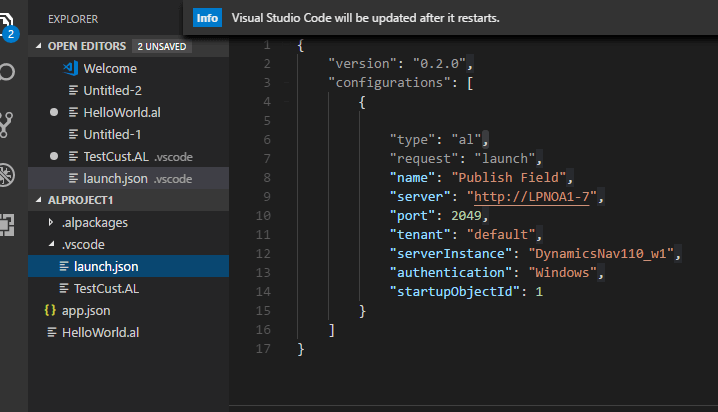
      • Now press shift+ctrl+P and Download Symbol

      • And the respective result will display in the Output section.

      6. Now create a Customer table extension object with one custom field say scheme code (you can make code on validate trigger as well if you want).

      7. Now Press F5to deploy and run the extension, it will get published to a specific Microsoft Dynamics NAV Server instance. The extension can also be installed for one or more tenants as well. (some parts of the content here are drawn from https://docs.microsoft.com)

      To learn more about Upgrade Dynamics NAV to D365 Business Central, connect with Alletec experts.

       

      Let's Build Smarter, Agile, and Scalable Solutions Together
      Talk to An Expert
      Talk to An Expert Alletec
      Mar 23, 2018 3789 views

      About Rishabh Shukla

      I am Rishabh Shukla, Technical Architect at All e Technologies Ltd, with over 16 years of experience in Dynamics NAV and Business Central implementations. My expertise includes Business Central localization, Power Platform, Power Automate, DevOps, and Copilot Studio. I have worked across India and Europe, developing solutions like Cyborg, ProActivate, and the Reconciliation Engine. As the 2nd runner-up in the Business Central Hackathon 2021, I am passionate about using technologies such as Azure OpenAI to drive automation and transformation. 

      Recent Posts

      Dynamics 365 Project Operations for Professional Services: 5 Ways to Simplify Project Expense Management

      Jan 27, 2026

      Dynamics 365 Project Operations for Professional Services: 5 Ways to Simplify Project Expense Management
      Read Full Blog    
      Decoding Microsoft’s New IQ Layer: Work IQ, Fabric IQ, and Foundry IQ Explained

      Jan 13, 2026

      Decoding Microsoft’s New IQ Layer: Work IQ, Fabric IQ, and Foundry IQ Explained
      Read Full Blog    
      5 Cybersecurity Mistakes Your Business Cannot Afford in 2026

      Jan 9, 2026

      5 Cybersecurity Mistakes Your Business Cannot Afford in 2026
      Read Full Blog    

      Alletec blends deep Microsoft solutions expertise with industry knowledge and 25+ years of experience to catalyse digital transformation and amplify business outcomes for enterprises.

      FOLLOW US
      LATEST NEWS
      • Alletec recognized as 2025/26 Inner Circle Winner for Microsoft AI Business Solutions
      • From Copilot to Sustainability: Alletec to Lead Expert Discussions at Directions ASIA 2025
      • Alletec Strengthens North American Footprint with Major Microsoft Dynamics 365 Contact Center Win
      • Alletec Expands to the Middle East with a Subsidiary in Dubai
      • Alletec Named a Great Place to Work® for the Third Consecutive Year
      CONTACT US
      • India: A-1, Sector - 58 Noida - 201 301, India +91 120 3000 300

      • USA: 5605 North MacArthur Blvd., Ste 1000, Irving, Texas 75038 +1 469 767 9753

      • Kenya: The Westwood Vale Close Off Ring Road Westland +254 725 074 589

      • Canada: 181 Bay Street, #1800, Toronto, Ontario, M5J 2T9 +1 289 763 5998

      • United Arab Emirates: IFZA Business Park, DDP, PO Box 342001, Dubai +971 58 248 0169

      • info@alletec.com
      Quick Links
      • eBooks
      • Blogs
      • Case Studies
      • Brochures
      • Life At Alletec
      • Company Profile
      • Partner Program
      • Privacy Policy

      @ 2026 Alletec. All rights reserved.

      Chatbot IconAsk me anything