



Alletec Logo
  • Solutions & Services
    • AI Business Applications
    • Enterprise Data Services
    • AI & Intelligent Solutions
    • Azure Infrastructure & Platform Services
    • Security Solutions
    • Services
    • Partner Services
    • Modern Work & Digital Productivity
    Microsoft Dynamics 365Microsoft Dynamics 365Power PlatformPower Platform
    • BusinessCentralBusiness Central
    • SalesSales
    • FinanceFinance
    • Customer InsightsCustomer Insights | Marketing
    • Supply Chain ManagementSupply Chain Management
    • Customer ServiceCustomer Service
    • Project OperationsProject Operations
    • Field ServiceField Service
    • Human ResourcesHuman Resources
    • Contact CenterContact Center
    • Power BIPower BI
    • Power AppsPower Apps
    • Power AutomatePower Automate
    • Power PagesPower Pages
    Microsoft AzureData Engineering & Modern Data Platforms
     
    • Modern Data PlatformsModern Data Platforms
    • Data EngineeringData Engineering
    • Microsoft FabricMicrosoft Fabric
    • Data Governance & QualityData Governance & Quality
    • Analytics & InsightsAnalytics & Insights
      AI & Intelligent SolutionsAI & Intelligent Solutions
       
      • AI Agents & CopilotsAI Agents & Copilots
      • Unified Intelligence FrameworkUnified Intelligence Framework
      • Applications ModernizationApplications Modernization
      • Applied AI Use CasesApplied AI Use Cases
      • RPARobotic Process Automation (RPA)
        • Power BIPower BI
        • Power AppsPower Apps
        • Power AutomatePower Automate
        • Power PagesPower Pages
        Microsoft AzureAzure Infrastructure & Platform Services
        • Cloud Architecture & Landing ZonesCloud Architecture & Landing Zones
        • Resilience, Backup & Disaster RecoveryResilience, Backup & Disaster Recovery
        • Azure InfrastructureAzure Infrastructure (IaaS)
        • Azure Platform ServicesAzure Platform Services (PaaS)
        • Hybrid & Multi-Cloud EnablementHybrid & Multi-Cloud Enablement
        • Cloud Operations & FinOpsCloud Operations & FinOps
        • Security & GovernanceSecurity & Governance
        • Managed ServicesAzure Managed Services
        • Modern Data PlatformsModern Data Platforms
        • Data EngineeringData Engineering
        • Microsoft FabricMicrosoft Fabric
        • Data Governance & QualityData Governance & Quality
        • Analytics & InsightsAnalytics & Insights
        • Cloud Architecture & Landing ZonesCloud Architecture & Landing Zones
        • Resilience, Backup & Disaster RecoveryResilience, Backup & Disaster Recovery
        • Azure InfrastructureAzure Infrastructure (IaaS)
        • Azure Platform ServicesAzure Platform Services (PaaS)
        • Hybrid & Multi-Cloud EnablementHybrid & Multi-Cloud Enablement
        • Cloud Operations & FinOpsCloud Operations & FinOps
        • Security & GovernanceSecurity & Governance
        • Managed ServicesAzure Managed Services
          • Data EngineeringData Engineering
          • Microsoft FabricData Fabric
          • AI Powered SolutionsAI-Powered Solutions
          • RPARobotic Process Automation (RPA)
          D365 Support and ServicesD365 Support and Services
          • D365 Applications ModernizationD365 Applications Modernization
          • D365 Implementation ServicesD365 Implementation Services
          •  D365 Rescue & Recovery Services D365 Rescue & Recovery Services
          • Upgrade Nav to BCUpgrade NAV to D365 Business Central
          • GP to BCGP To D365 BC Migration
          • Customer EngagementD365 Customer Engagement Services
          • NAVD365 Business Central | NAV
          • AIMAIM Modernization Center
            • Data EngineeringData Engineering
            • Microsoft FabricMicrosoft Fabric
            • RPARobotic Process Automation (RPA)
            • AI PoweredAI-Powered Solutions
            • AIM Modernization CenterAIM Modernization Center
            • MasterVARMasterVAR
            Security SolutionsSecurity Solutions
             
            • Cyber Threat DefenseCyber Threat Defense
            • Protect Business DataProtect Business Data
            • Manage DevicesDevice Management
            • Secure Remote AccessSecure Remote Access
            • Keep Employees ConnectedKeep Employees Connected
              Modern Work & Digital ProductivityModern Work & Digital Productivity
               
              • Teams & CollaborationTeams & Collaboration
              • SharePoint & Knowledge ManagementSharePoint & Knowledge Management
              • Microsoft 365 CopilotMicrosoft 365 Copilot
              • Secure remote & hybrid workSecure remote & hybrid work
              • Industries
                • Professional Services
                • Manufacturing
                • Education
                • Trade & Distribution
                • Financial Services
                • Retail & Digital Commerce
                • Travel
                • Food & Beverages
                  • Bakery
                  • Beverages
                  • Confectionary
                  • Dairy
                  • Fresh Produce
                  • Frozen & Packaged Food
                  • Meat & Poultry
                  • Sauces & Dressings
                  • Snacks
                  • Spices
              • Products
                • Industry Solutions
                • Dynamics 365 Accelerators
                • Travel 365Travel 365
                • EdTech 365EdTech 365
                • Smart-CXSmart-CX
                • BAFINS-CXBAFINS-CX
                • EPC 365EPC 365
                • solutions-for-ngoSocialImpact 365
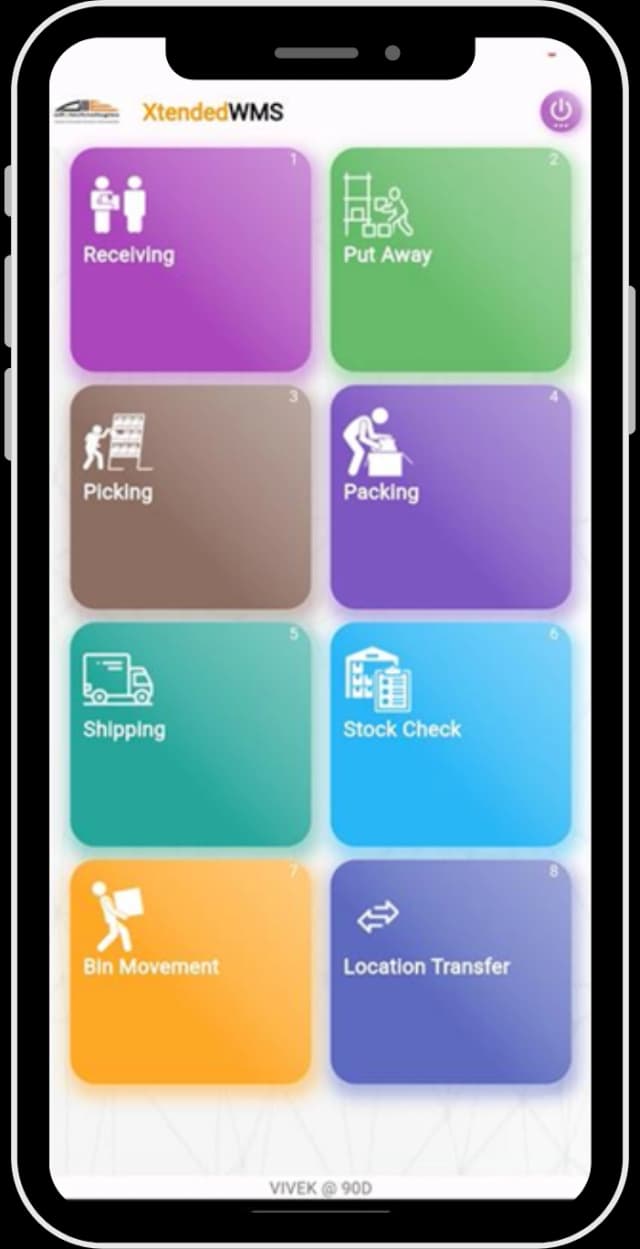
                • XtendedWMSXtendedWMS
                • socialRelaySocialRelay
                • ProActivateProActivate
                • CyborgCyborg
                • P2P 365P2P 365
              • Resources
                • Alletec Blog
                • Videos
                • Case Studies
                • Brochures
                • eBooks & Infographics
              • Alletec
                • Company Profile
                • Board of Directors
                • Investor Relations
                • Life @ Alletec
                • Careers
                • Contact Us
              Great Place to work Alletec
              Say Goodbye to Inventory Management worries with XtendedWMS
              Say Goodbye to Inventory Management worries with XtendedWMS
              Say Goodbye to Inventory Management worries with XtendedWMS

              Say Goodbye to
              Inventory Management worries
              with XtendedWMS

              Download brochure

              Scales with your warehouse — Mobile-first | Android-ready | Real-time

              XtendedWMS is a mobile-first warehouse and inventory management solution that helps businesses eliminate warehouse inefficiencies, reduce inventory errors, and boost operational productivity — all while working seamlessly with Microsoft Dynamics 365 Business Central.

              Whether you operate a small warehouse or a multi-location facility, XtendedWMS enables your team to perform faster and smarter. It leverages barcode and QR scanning on Android-based handhelds and mobile devices to deliver real-time inventory updates—no middleware required.

              Reduce manual errors with fast and accurate scanning

              Lower operating costs with device-based licensing

              Optimize warehouse workflows from receiving to shipping

              Gain complete control with real-time dashboards and reporting in D365 BC

              Inventory Management with XtendedWMS
              Warehouse Management Software WMS software

              Warehouse Management Software (WMS software) is projected to lead market growth with the highest CAGR from 2025 to 2030, driven by rising adoption among SMEs worldwide *

              *grandviewresearch

              XtendedWMS Functional Overview

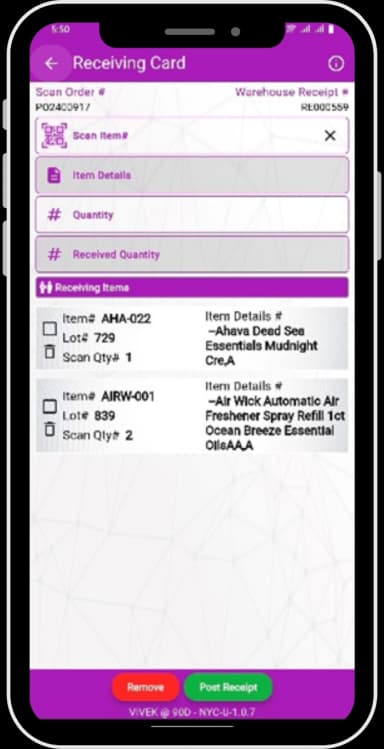
              • Streamline warehouse management operations with barcode/QR code scanning for incoming shipments.
              • XtendedWMS supports both full and partial receipts with real-time posting to Microsoft Dynamics 365 Business Central.
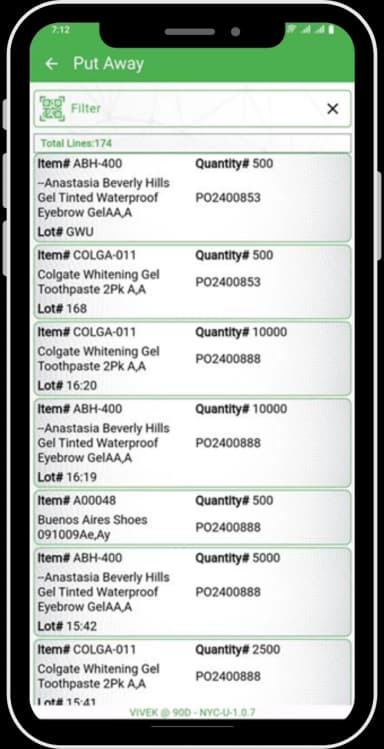
              • Leverage multi-bin put-away with automatic line-splitting to ensure efficient storage and optimized inventory control.
              Receiving & Put-AwayReceiving & Put-Away
              • Streamline warehouse management operations with barcode/QR code scanning for incoming shipments.
              • XtendedWMS supports both full and partial receipts with real-time posting to Microsoft Dynamics 365 Business Central.
              • Leverage multi-bin put-away with automatic line-splitting to ensure efficient storage and optimized inventory control.
              Receiving & Put-AwayReceiving & Put-Away
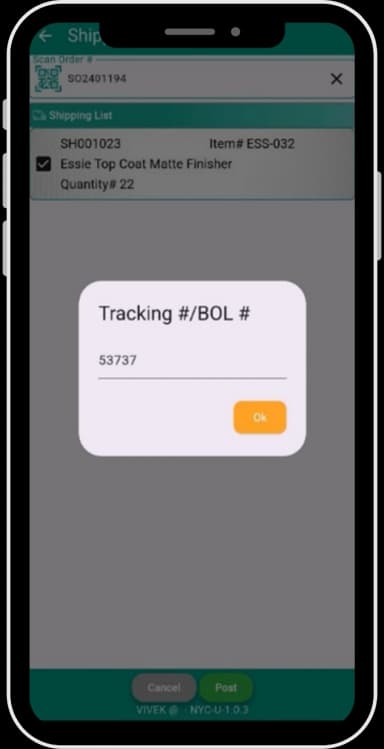
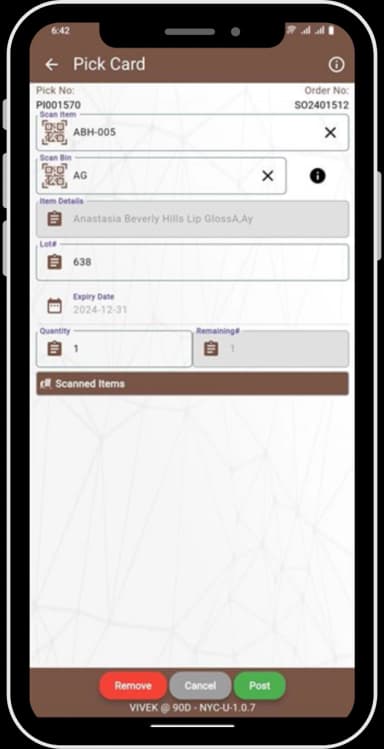
              • The shipping and picking process is enhanced with both guided and unguided picking options.
              • BIN-based suggestions help optimize picking paths, and shipments can be posted in real-time directly from handheld scanners, improving speed and reducing manual errors.
              Shipping & PickingShipping & Picking
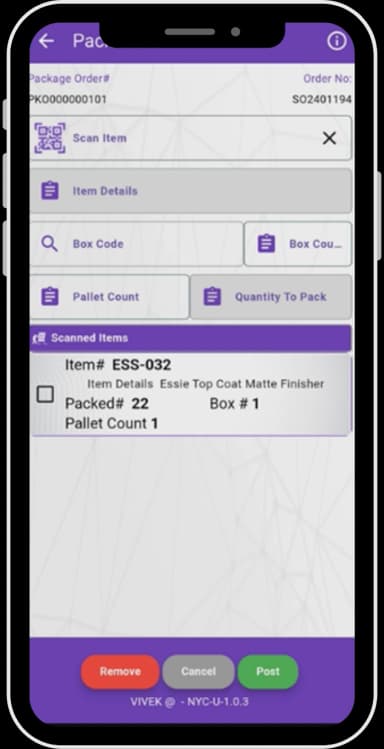
              • Auto add picked items to a packing order.
              • XtendedWMS intelligently suggests the container type—whether a box or pallet—based on configurations in D365 BC.
              • Achieve posting and release of packing for shipment through a simple scan.
              Packing Order
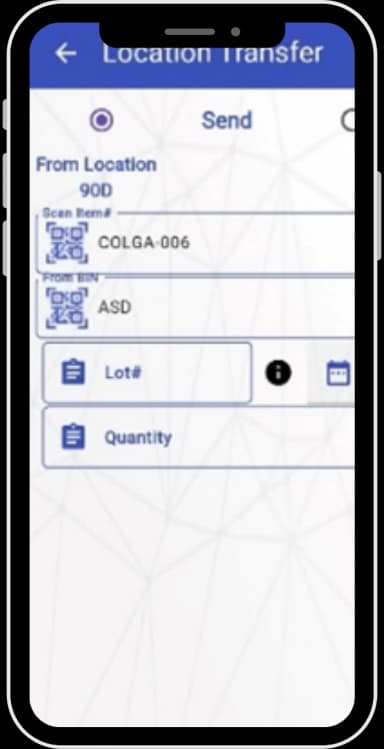
              • Perform inter-warehouse transfers by scanning items, BINs, and Lot numbers.
              • Create and post transfers efficiently, ensuring accurate stock movement tracking across locations.
              Location Transfer
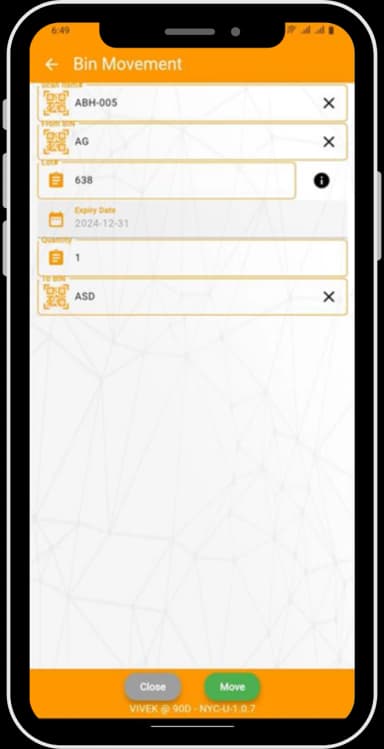
              • Simply scan items to create movement requests for ad-hoc bin transfers
              • Real time updates within D365 Business Central keeps stock locations accurate at all times.
              Bin Movement
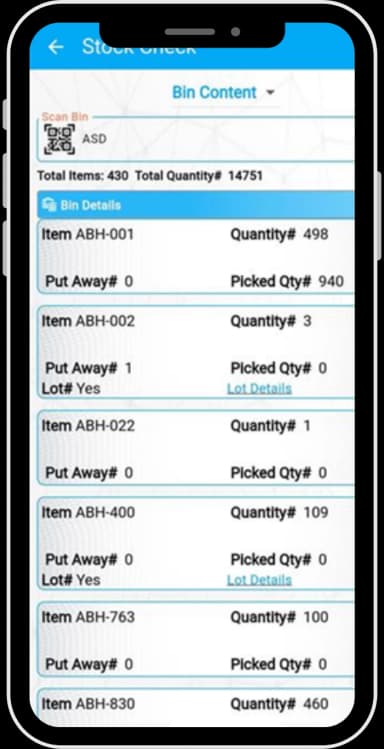
              • XtendedWMS enables on-the-spot inventory checks.
              • Instantly view stock levels across multiple inventory dimensions by scanning an item or BIN.
              • Improved inventory control results in faster and informed decision-making.
              Stock Check
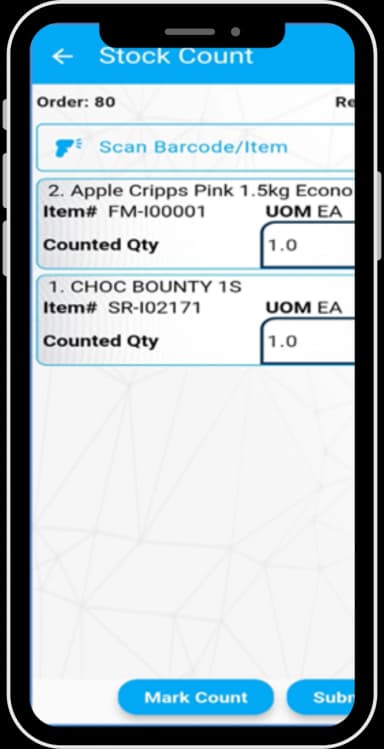
              • Simplify physical inventory counts through real-time, parallel stock taking using handheld scanners.
              • Ensure faster, more accurate inventory audits with minimal disruption to operations.
              Physical Stock Take
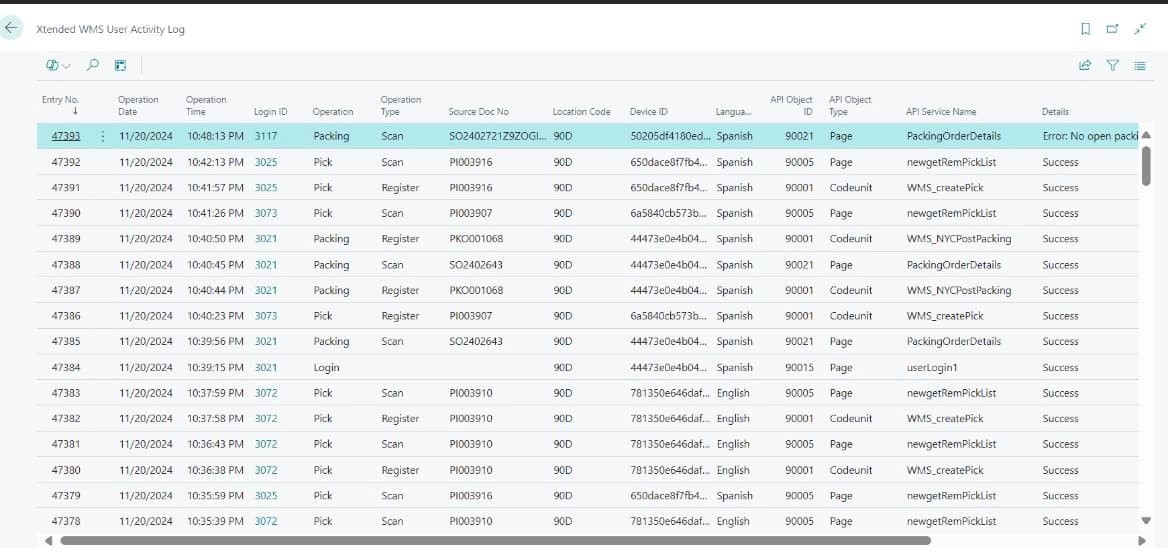
              • Every action in the XtendedWMS app is recorded in Business Central with detailed timestamps and user IDs—making it easy to track transactions and troubleshoot issues quickly.
              • Warehouse managers can monitor daily operations, see who performed each task, and review both successful and failed transactions.
              • Turn log data into actionable insights using Business Central’s page analysis with pivot mode, or export it to your preferred analytics tool.
              • With XtendedWMS, real-time operational data powers smarter decisions and drives measurable improvements in warehouse productivity.
              Reporting and Analytics

              Key Benefits of XtendedWMS

              Key Benefits of XtendedWMS image

              Why XtendedWMS?

              Business Central icon

              Real-Time Integration with D365 BC

              XtendedWMS works natively with Business Central’s warehouse module — no middleware or duplicate databases. All transactions are instantly reflected in BC.

              Supports-All-Key-Warehouse-Operations

              Supports All Key Warehouse Operations

              Built for real-world warehouse scenarios with support for full/partial receipts, multi-bin put-away, guided picking, ad-hoc transfers, and more.

              Scalable-and-Configurable

              Scalable & Configurable

              Configure packing logic, container types, and workflows based on your BC setup. Easily scale across warehouses.

              Multi-language & Easy Adoption icon

              Multi-language & Easy Adoption

              Dashboard-based navigation with consistent UI and multilingual support reduces onboarding friction for warehouse teams.

              Success Stories

              Retail & eCommerce

              Discover how Alletec's XtendedWMS helped US-based New York Cosmetics streamline their warehouse operations with scanning-enabled workflows integrated into Microsoft Dynamics 365 Business Central.

              Read More

              Get Started Today

              Explore How Xtended WMS, Powered by Microsoft Dynamics 365 & AI, Can Streamline Warehouse Operations and Accelerate Business Growth

              Phone
              Industries *
              By submitting this form, you agree to receive communications from Alletec.

              Got questions about XtendedWMS? Check out our FAQs for best answers

              Yes. Xtended WMS is available on Microsoft AppSource. You can download the app directly or book a demo through the “Contact Us” page to explore how Xtended WMS fits into your warehouse operations.
              Xtended WMS works natively with Business Central’s warehouse module, offering robust multi-warehouse management without the need for middleware or a local database. It uses Business Central APIs for real-time data validation and instant transaction posting, ensuring seamless integration and system integrity.

              Xtended WMS consists of two components:

              • The Xtended WMS App, installed on handheld scanning or mobile devices.
              • The Xtended WMS extension for your Business Central tenant Installation is done via an Assisted Setup wizard included with the application package.
              Xtended WMS follows a per-device subscription licensing model. There is no limit on the number of warehouse users. Warehouse users do not need to be licensed Business Central users. Instead, user setup is handled by the Warehouse Manager directly within Business Central.
              Users can log in either by entering credentials or scanning a QR code on their ID cards. This allows quick and easy access — especially useful in warehouse environments where gloves are worn — enhancing both usability and productivity.
              Yes. Xtended WMS uses intuitive picking flows, barcode scanning, and real-time inventory validation to minimize manual entry errors. The system also prevents picking & shipping if the inventory is unavailable, helping ensure accurate and efficient fulfillment.
              Packing is a critical and often mandatory step between picking and shipping in warehouse workflows. While Dynamics 365 Business Central supports picking and shipping, it lacks dedicated packing features. Xtended WMS bridges this gap with its Packing Module, which suggests suitable box types based on the items picked. The system requires users to scan the packing order before the shipment scan — ensuring completeness and compliance with standard packing procedures.
              Yes. Xtended WMS supports multiple warehouses. During login, users select their warehouse location, and the system then displays only the documents relevant to that location. The app also allows users to perform stock transfers between warehouse locations.
              With barcode and QR code scanning, Xtended WMS enables accurate item identification and real-time handling of inventory and document data at every stage — from receiving to shipping. As a powerful inventory optimization software, it uses built-in automation to post warehouse documents directly from scanning devices, streamlining workflows and reducing human error.
              Xtended WMS runs on Android handheld scanners and features a lightweight, user-friendly interface. It currently supports English and Spanish, with the ability to extend to other languages as needed. Users can select their preferred language at login, making adoption easy for multilingual warehouse teams.
              Xtended WMS is built for real-time data validation and does not use middleware to cache data for offline sync. Therefore, it requires an active internet connection with D365 Business Central. However, for specific customer scenarios, limited offline functionality can be custom-developed as needed.
              Xtended WMS logs all activities performed by warehouse workers on the scanning app, recording timestamps and user IDs directly in Business Central. Managers can view logs and generate reports to track key metrics such as daily operations, time per task, and individual worker performance, enabling data-driven decisions and process improvements.

              Alletec blends deep Microsoft solutions expertise with industry knowledge and 25+ years of experience to catalyse digital transformation and amplify business outcomes for enterprises.

              FOLLOW US
              LATEST NEWS
              • Alletec Recognized as 2025/26 Microsoft Inner Circle Member for AI Business Solutions
              • From Copilot to Sustainability: Alletec to Lead Expert Discussions at Directions ASIA 2025
              • Alletec Strengthens North American Footprint with Major Microsoft Dynamics 365 Contact Center Win
              • Alletec Expands to the Middle East with a Subsidiary in Dubai
              • Alletec Named a Great Place to Work® for the Third Consecutive Year
              CONTACT US
              • India: THE GRENT, A-9, Upper Ground Floor, Sector-136, Noida – 201304, Uttar Pradesh

              • USA: 5605 North MacArthur Blvd., Ste 1000, Irving, Texas 75038 +1 469 767 9753

              • Kenya: The Westwood Vale Close Off Ring Road Westland +254 725 074 589

              • Canada: 181 Bay Street, #1800, Toronto, Ontario, M5J 2T9 +1 289 763 5998

              • United Arab Emirates: IFZA Business Park, DDP, PO Box 342001, Dubai +971 58 248 0169

              • info@alletec.com
              Quick Links
              • eBooks
              • Blogs
              • Case Studies
              • Brochures
              • Life At Alletec
              • Company Profile
              • Partner Program
              • Privacy Policy

              @ 2026 Alletec. All rights reserved.

              Chatbot IconAsk me anything