The last article discusses the perennial problems caused in ERP (and most other enterprise business applications) implementation projects due to the adoption of waterfall methodology. We have also discussed the advantages of following an Agile approach, and the impracticality of using the copybook pure Agile for such projects. This brings us to the natural question – what’s the solution?
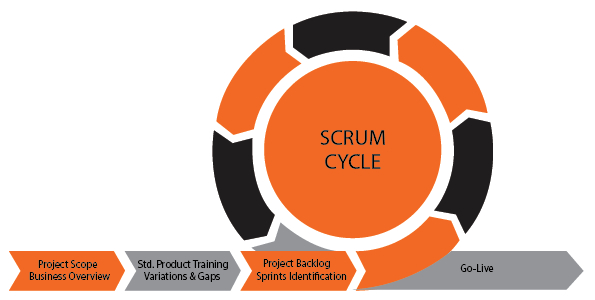
The solution might be ‘Hybrid-Agile’ – but what does that really mean? A disclaimer first – the intent of this article is not to explain Agile methodology. We only conceptualize a model that captures variations that make Agile practical to use for ERP implementations, and categorize it as Hybrid-Agile.
Hybrid Agile Framework
Instead of getting trapped in to the explanation of the fancy name Hybrid-Agile, let’s fast-forward and try conceptualizing a framework for success.
1. What should be the elements of a successful (or less risky) methodology for a typical ERP implementation?
- Scope identification upfront is necessary: Being fixed cost projects, identification of Scope is necessary for even bidding and contract finalization. The key here is – getting a scope document ready that has the right level of depth and coverage. Too little will become risky, and too much will threaten to drag the project once again on a waterfall track. Here is an extract from an ERP implementation project scope document that I find having just the right level of depth.
General ledger
- General Ledger Journals
- Recurring Journals, Batch posting of journals
- Intercompany Accounting
- Year End Close
- Complete Year End Preparation
- Create Closing Sheet
Taxation
- GST & TDS
- Transaction capture
- Govt interface
- Tax reporting
Budget control
- Budgeting segments
- Budget control rules
- Enforcing control – approvals and exception approvals
Accounts payable
- Post Vendor Invoices from Purchase Order – 2 way & 3 way matching
- Post vendor invoices without POs (utilities, misc invoices)
- Process vendor payments, apply payments against invoices
- Foreign currency provisioning
- AP reporting
Accounts receivable
- CRM integration for invoicing parameters
- Sales orders & invoices from above
- Misc. invoicing (e.g. sale of old assets etc.)
- Customer payment processing
- Application of payments with invoices
- Customer refunds
- AR reporting
Collections
- AR data needed for collection activities
- Activity types & triggers for each activity
- Outcome types and follow on actions
- Automated dunning
- Write off & provisioning
Fixed assets
- Asset Master review
- Memorandum asset books – stat, IT, GAAP etc
- Acquisition – by procurement, by project by inventory capitalization
- Depreciation rules
- Asset retirement – sale, scrap, impairment
- Asset reporting
Cash Management
- Bank account setups
- Cheques & NEFT integration
- Credit card gateway integration
- Automated bank reconciliation
- Bank reporting
Procurement
- Requisitioning
- RFQ
- Rate contracts & Blanket orders
- Ordering
Logistics
- Item master design
- Receiving
- Processing
- Shipping – CRM integration
- Customer deployment & capitalization – SFDC integration
- Scrapping of customer assigned assets – CRM integration
Out of scope
- Asset location after deployment cannot be tracked in ERP – CRM will be used for this purpose
- Budget planning – will be looked at after the system has 1 or 2 years of data
- All State taxes / VAT
Others
- Custom dashboard development with Power BI – only F&SC embedded dashboards will be deployed
- Custom development of reports will be limited to 10.
Business overview from the customer: The following must be done:
- Customer side org chart is obtained in advance. This depicts all business units, departments and geographies, with names of people heading these functions.
- A Business Overview template is created, and shared (along with a filled sample) with all the departmental/ function heads in advance. A 30 minutes call is scheduled with the key people (before starting the project), and this template is explained. The key elements this template would comprise of are:
- Overview of the business, with department/ department head’s role and responsibilities
- Overview of functions & processes in the department
- Current systems in use, and the IT infrastructure available
- Key points of inefficiency & deficiency in the systems
- External systems integration points
- Types of transactions, and transaction volumes
- Any applicable regulatory and legal requirements
- Department level org structure, which role does what
- Expectations from a future system
- Key users asked to fill the template, as a pre-requisite to project kickoff. If this is not possible, then there be a gap (of at least a week or two) after kickoff (where this template is introduced). Key users will have to fill the template, share back, and the project team will have to study/ analyze the filled templates.
- After receiving the filled Business Overview templates, a couple of hours session is scheduled with each key user to together review (understand & ask) the filled template.
- Only one such session is expected per department. These business overview sessions must not be done in parallel. The entire project team should attend all the business overview sessions.
- Standard Product Training: Up to 2 weeks training is conducted for all key users on the standard product. Users will go hands-on during this training, and the training will be quite elaborate. By the end of this training – users will become very conversant with product UI, navigation, and (standard) functionality.
- Conference room pilots are now conducted, department by department (can be done in parallel), taking the Business Overview template filled by the department as base, and showcasing how the mentioned functions/ processes are accomplished in the product.
- User feedbacks are obtained (as part of conducting the CRP) to identify gaps in the system. Gaps are documented in a ‘Process-flow variations & gaps’ template. These documents become attachments to the main Business Overview document initially prepared by the customer.
- At the end of CRP, users sign-off on the ‘variations & gaps’ documents.
2. Choose your poison
Accomplishing the steps mentioned in point 1 above will substantially enhance the user alignment, and thus the chances of project success. At this stage you may pick the project execution methodology you fancy, though we recommend Agile.
- Go Agile
- Identify ‘Department wise’ User Stories – with only ‘story card’ level descriptions (usually 1 sentence) – for all departments. As organizations mature, a standard set of user stories will become a part of their intellectual assets. This will help jump starting projects and save costs.
- Group a set of related User Stories (typically parts of a large cross department function like ‘purchase to pay’) in to a set of Sprints (with the usual constraints of Agile). Identify a set of initial (several) Sprints.
- For the first 1 or 2 sprints, write the Acceptance Criteria for each user story – where the users had identified variation or gaps
- Get the users to verify the User Stories (card level), and Acceptance criteria (where variation or gaps are identified) for correctness and completeness. Users to add/ change for finalization.
- Project team now sets at configuring and customizing the system based on the set of user stories and Acceptance Criteria
- Users test the system (hands-on) with test data (actual dataset taken from the customer), and provide feedback/ acceptance
- Steps (iii) to (vi) are repeated for the entire system
Go Waterfall
If you are a waterfall methodology addict, or if for some reason waterfall methodology is the only feasible option for you:
- Plan the project execution as a single, or multiple releases – depending on the size of the system
- Configure, develop, and unit test the system in the traditional manner
3. Plan and execute the other necessary tasks
- Data preparation, extraction, and upload
- System set up – Dev, Test, Production environments
- Integrations
- Gather user roles, access rights information, and set up in the system
- Load the Dev & Test environments with test data
- Setup whatever DevOps environment is chosen
4. Conduct System Testing
5. Conduct User Training (for now configured and customized system)
6. Conduct User Acceptance Testing
7. Go Live
ERP implementations are complex projects, made further complex by the often missing user alignment. ERP implementations are also expensive projects, made further expensive by the costs that go in to change management within the organization. Our aim is to help organizations in the management of this complexity, and optimization of costs through the adoption of field tested processes and execution methodologies. You can also read the Can ERP Implementations Transition From Waterfall to Agile? (Part 1)