Alletec Logo
  • Solutions & Services
    • AI Business Applications
    • Enterprise Data Services
    • AI & Intelligent Solutions
    • Azure Infrastructure & Platform Services
    • Security Solutions
    • Services
    • Partner Services
    • Modern Work & Digital Productivity
    Microsoft Dynamics 365Microsoft Dynamics 365Power PlatformPower Platform
    • BusinessCentralBusiness Central
    • SalesSales
    • FinanceFinance
    • Customer InsightsCustomer Insights | Marketing
    • Supply Chain ManagementSupply Chain Management
    • Customer ServiceCustomer Service
    • Project OperationsProject Operations
    • Field ServiceField Service
    • Human ResourcesHuman Resources
    • Contact CenterContact Center
    • Power BIPower BI
    • Power AppsPower Apps
    • Power AutomatePower Automate
    • Power PagesPower Pages
    Microsoft AzureData Engineering & Modern Data Platforms
     
    • Modern Data PlatformsModern Data Platforms
    • Data EngineeringData Engineering
    • Microsoft FabricMicrosoft Fabric
    • Data Governance & QualityData Governance & Quality
    • Analytics & InsightsAnalytics & Insights
      AI & Intelligent SolutionsAI & Intelligent Solutions
       
      • AI Agents & CopilotsAI Agents & Copilots
      • Unified Intelligence FrameworkUnified Intelligence Framework
      • Applications ModernizationApplications Modernization
      • Applied AI Use CasesApplied AI Use Cases
      • RPARobotic Process Automation (RPA)
        • Power BIPower BI
        • Power AppsPower Apps
        • Power AutomatePower Automate
        • Power PagesPower Pages
        Microsoft AzureAzure Infrastructure & Platform Services
        • Cloud Architecture & Landing ZonesCloud Architecture & Landing Zones
        • Resilience, Backup & Disaster RecoveryResilience, Backup & Disaster Recovery
        • Azure InfrastructureAzure Infrastructure (IaaS)
        • Azure Platform ServicesAzure Platform Services (PaaS)
        • Hybrid & Multi-Cloud EnablementHybrid & Multi-Cloud Enablement
        • Cloud Operations & FinOpsCloud Operations & FinOps
        • Security & GovernanceSecurity & Governance
        • Managed ServicesAzure Managed Services
        • Modern Data PlatformsModern Data Platforms
        • Data EngineeringData Engineering
        • Microsoft FabricMicrosoft Fabric
        • Data Governance & QualityData Governance & Quality
        • Analytics & InsightsAnalytics & Insights
        • Cloud Architecture & Landing ZonesCloud Architecture & Landing Zones
        • Resilience, Backup & Disaster RecoveryResilience, Backup & Disaster Recovery
        • Azure InfrastructureAzure Infrastructure (IaaS)
        • Azure Platform ServicesAzure Platform Services (PaaS)
        • Hybrid & Multi-Cloud EnablementHybrid & Multi-Cloud Enablement
        • Cloud Operations & FinOpsCloud Operations & FinOps
        • Security & GovernanceSecurity & Governance
        • Managed ServicesAzure Managed Services
          • Data EngineeringData Engineering
          • Microsoft FabricData Fabric
          • AI Powered SolutionsAI-Powered Solutions
          • RPARobotic Process Automation (RPA)
          D365 Support and ServicesD365 Support and Services
          • D365 Applications ModernizationD365 Applications Modernization
          • D365 Implementation ServicesD365 Implementation Services
          •  D365 Rescue & Recovery Services D365 Rescue & Recovery Services
          • Upgrade Nav to BCUpgrade NAV to D365 Business Central
          • GP to BCGP To D365 BC Migration
          • Customer EngagementD365 Customer Engagement Services
          • NAVD365 Business Central | NAV
          • AIMAIM Modernization Center
            • Data EngineeringData Engineering
            • Microsoft FabricMicrosoft Fabric
            • RPARobotic Process Automation (RPA)
            • AI PoweredAI-Powered Solutions
            • AIM Modernization CenterAIM Modernization Center
            • MasterVARMasterVAR
            Security SolutionsSecurity Solutions
             
            • Cyber Threat DefenseCyber Threat Defense
            • Protect Business DataProtect Business Data
            • Manage DevicesDevice Management
            • Secure Remote AccessSecure Remote Access
            • Keep Employees ConnectedKeep Employees Connected
              Modern Work & Digital ProductivityModern Work & Digital Productivity
               
              • Teams & CollaborationTeams & Collaboration
              • SharePoint & Knowledge ManagementSharePoint & Knowledge Management
              • Microsoft 365 CopilotMicrosoft 365 Copilot
              • Secure remote & hybrid workSecure remote & hybrid work
              • Industries
                • Professional Services
                • Manufacturing
                • Education
                • Trade & Distribution
                • Financial Services
                • Retail & Digital Commerce
                • Travel
                • Food & Beverages
                  • Bakery
                  • Beverages
                  • Confectionary
                  • Dairy
                  • Fresh Produce
                  • Frozen & Packaged Food
                  • Meat & Poultry
                  • Sauces & Dressings
                  • Snacks
                  • Spices
              • Products
                • Industry Solutions
                • Dynamics 365 Accelerators
                • Travel 365Travel 365
                • EdTech 365EdTech 365
                • Smart-CXSmart-CX
                • BAFINS-CXBAFINS-CX
                • EPC 365EPC 365
                • solutions-for-ngoSocialImpact 365
                • XtendedWMSXtendedWMS
                • socialRelaySocialRelay
                • ProActivateProActivate
                • CyborgCyborg
                • P2P 365P2P 365
              • Resources
                • Alletec Blog
                • Videos
                • Case Studies
                • Brochures
                • eBooks & Infographics
              • Alletec
                • Company Profile
                • Board of Directors
                • Investor Relations
                • Life @ Alletec
                • Careers
                • Contact Us
              Great Place to work Alletec
              Blog

              Microsoft Dynamics 365 Finance and Supply Chain integration PART II – Leveraging REST framework

              AlletecAlletec

              In the last blog we saw how to consume REST APIs in D365 Finance and Supply Chain. In this blog, we will cover how to consume D365 Finance and Supply Chain’s REST API – and the advantage we have with OData.

              OData is a standard protocol for creating and consuming data. The purpose of OData is to provide a protocol that is based on Representational State Transfer (REST) for create, read, update, and delete (CRUD) operations. OData applies web technologies such as HTTP and JavaScript Object Notation (JSON) to provide access to information from various programs. OData provides the following benefits:

              • It lets developers interact with data by using RESTful web services.
              • It provides a simple and uniform way to share data in a discoverable manner.
              • It enables broad integration across products.
              • It enables integration by using the HTTP protocol stack.

              D365 Finance and Supply Chain provides an OData REST endpoint. This endpoint exposes all the data entities that are marked as ‘IsPublic’ in the Application Object Tree (AOT). It supports complete CRUD (create, retrieve, update, and delete) functionality that users can use to insert and retrieve data from the system.

              We will use Visual studio 2017 along with C# to demonstrate this. I will try to showcase the demonstration step by step:

              1. App Registration

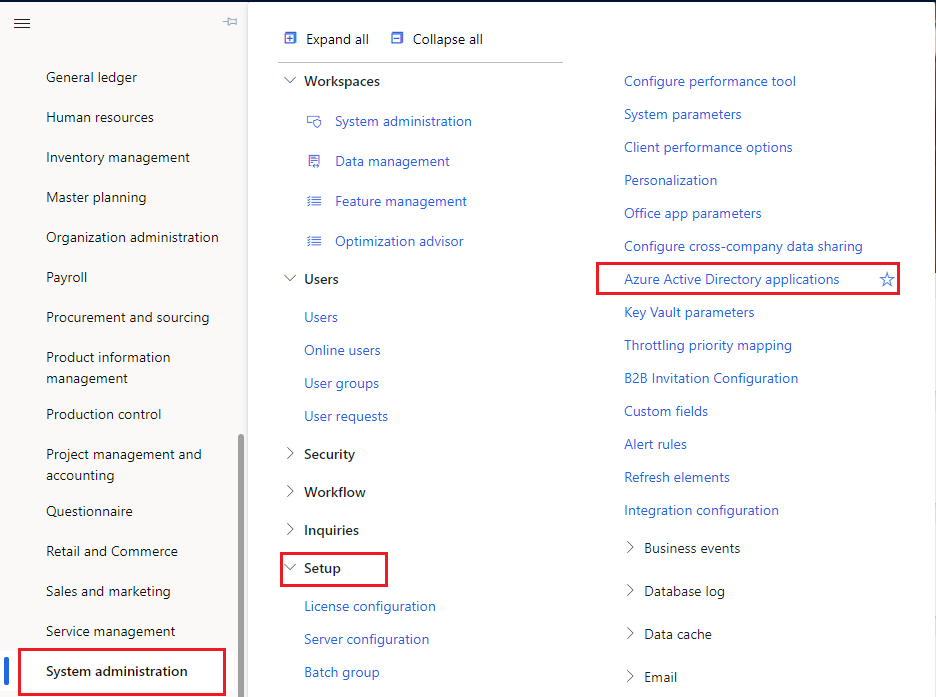
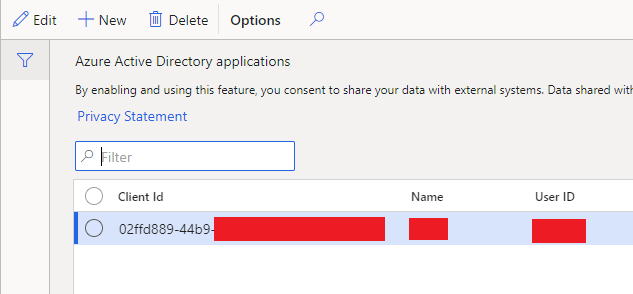
              Before we start writing logic for consuming the API, the apps via which D365’s API is going to get consumed needs to be registered in Azure portal under same tenant where D365 resides. One will have to collaborate with tenant’s admin or azure global administration to get your application registered. From this registration you will get ‘ClientAppId’ and ‘ClientAppSecret’. Using ‘ClientAppId’ create a record in Azure directory application forms in your D365 instance with whom we will integrate. Form is located at:
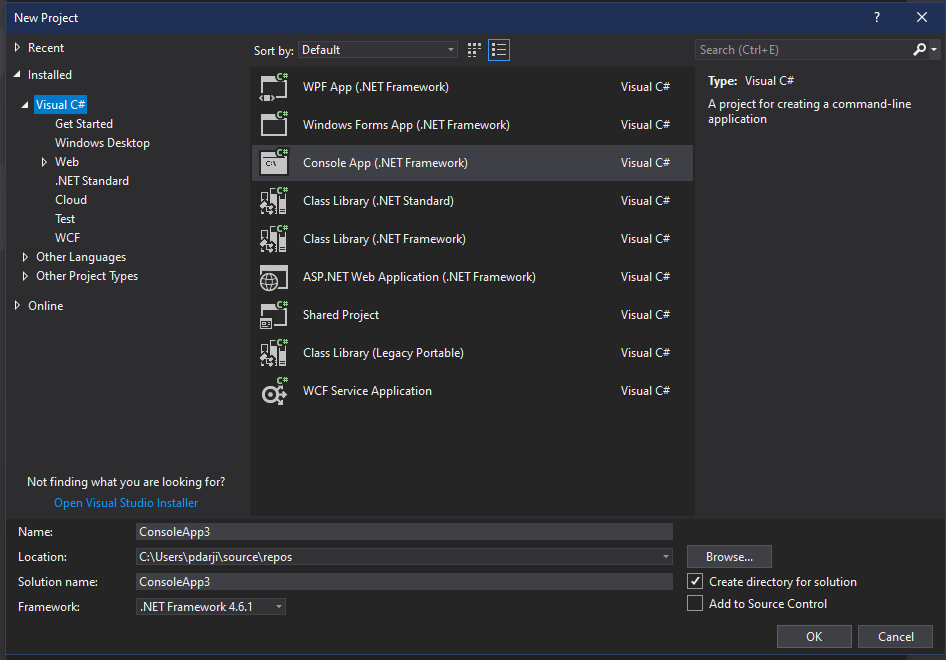
              2. Create a C# console project in VS 2017
               

              3. Add OData client extension in your project

              Like how we create SOAP client while consuming SOAP web service, similarly we will create OData client to consume OData REST API. First, we need OData client extension in our project which is available via extension as:
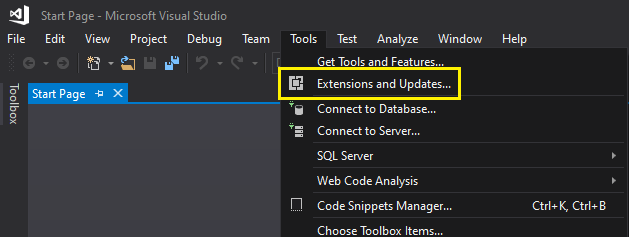
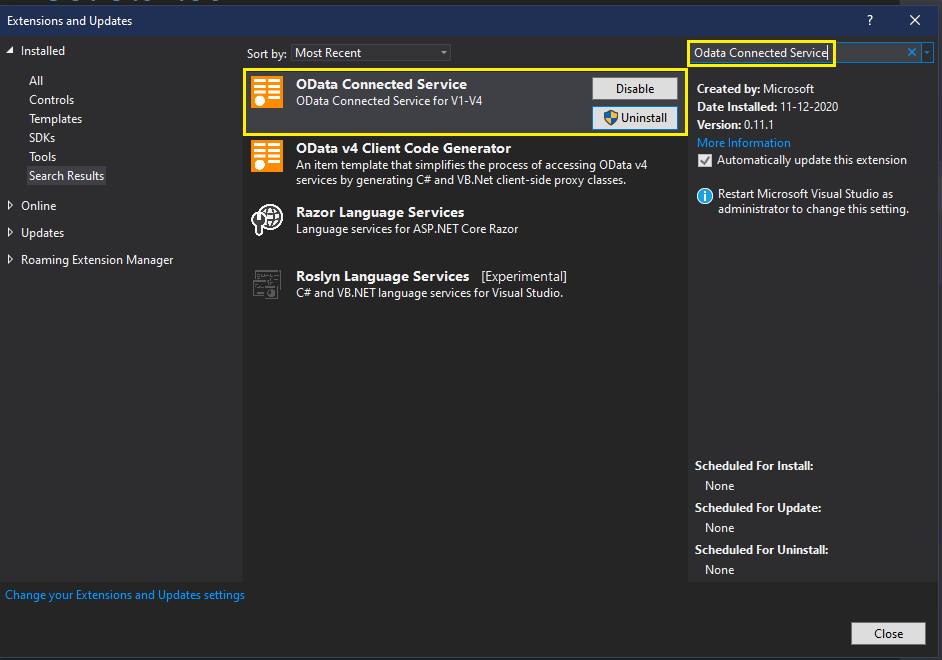
              Search and install OData Connected service extension as:
               

              4. Adding and modifying AuthenticationUtility project

              When we call the API, it needs to be authenticated. There are sample codes which we can use in our project. Grab the authentication utility project from

              https://github.com/microsoft/Dynamics-AX-Integration/tree/master/ServiceSamples

              and add this project to your solution. Once you add the project your solution explorer should look like:
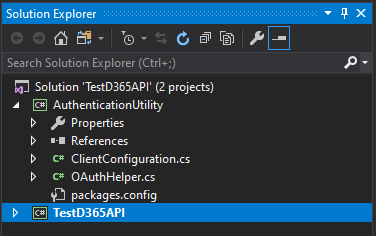
               

              Expand authentication utility project, expand references, right click on references, and select Manage NuGet Packages. Click on ‘Restore’ button.
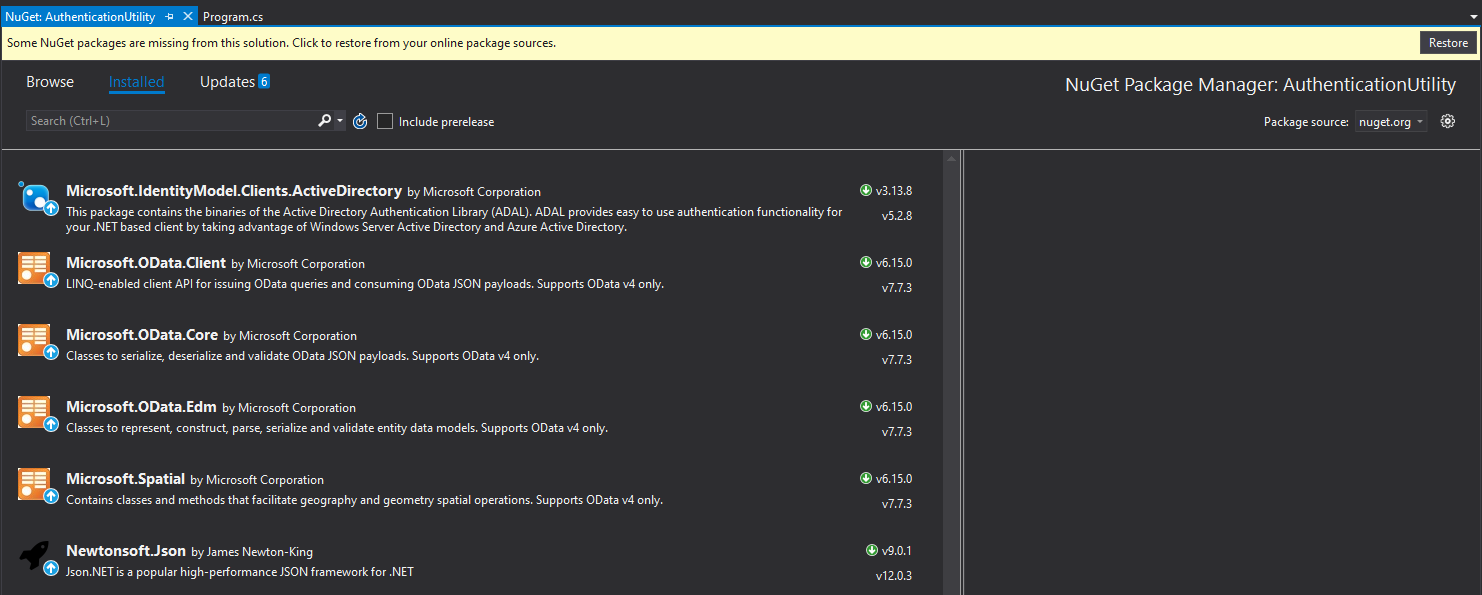
               

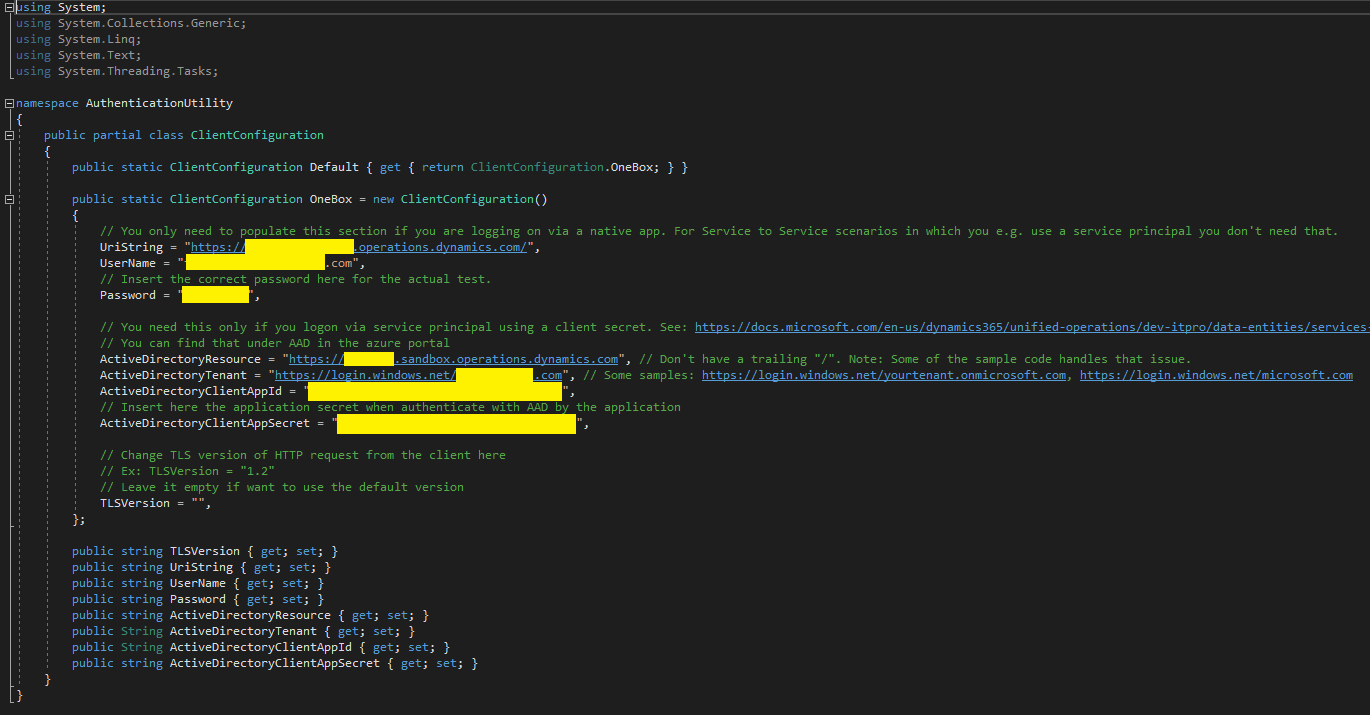
              Now open ClientConfiguration.cs file and modify its content for:

              UriString – Your D365 instance base url with trailing ‘/’

              UserName  – Username

              Password – Password of the user

              ActiveDirectoryResource – Your D365 instance base url without trailing ‘/’

              ActiveDirectoryTenant – your tenant url

              ActiveDirectoryClientAppId – ClientAppId value which we collected in Step 1

              ActiveDirectoryClientAppSecret – ClientAppSecret value which we collected in Step 2

              Save the project by pressing Ctrl+S.
               

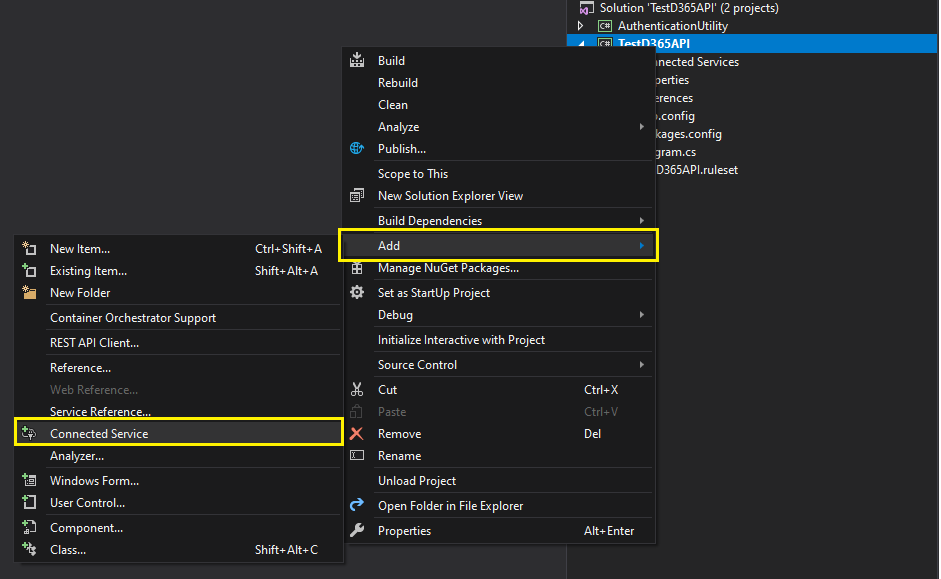
              5. Adding connected service via OData client

              Right click on your console project and add connected service
              Select OData Connected service option
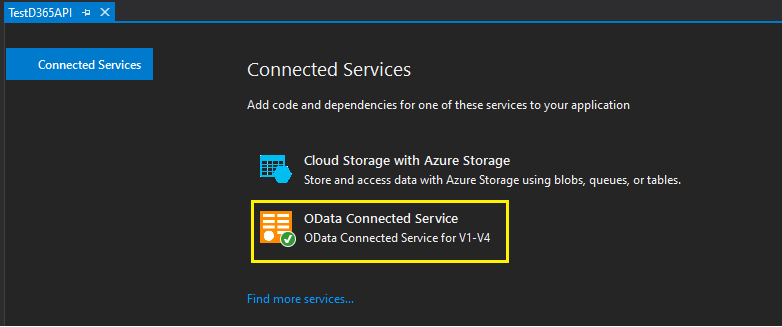
               

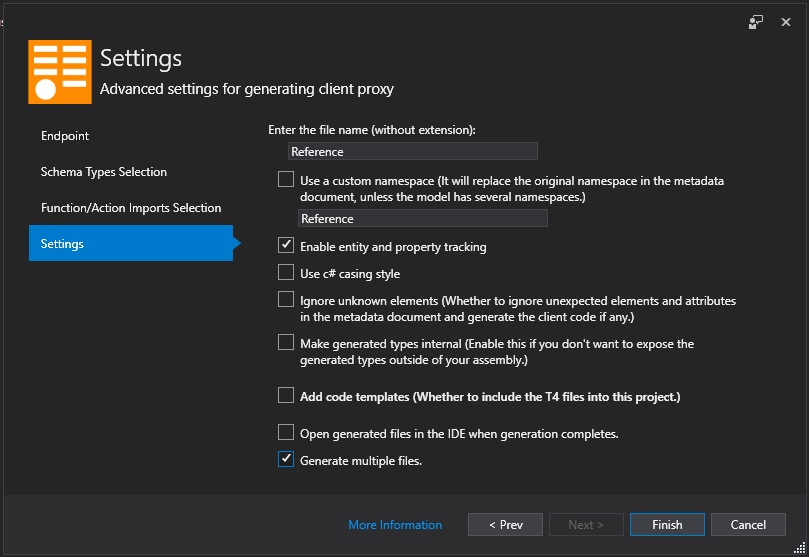
              You will be presented with a wizard in which we have to specify various values. Once done it will add all the relevant artefacts to our console project.
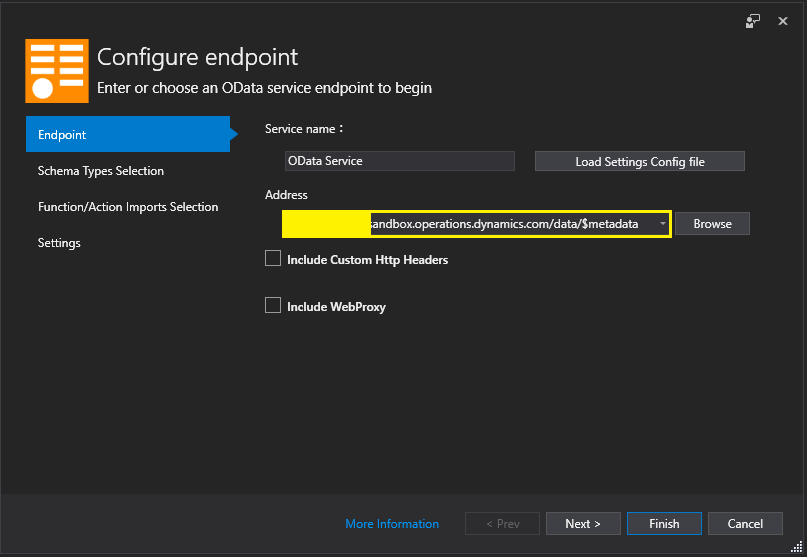
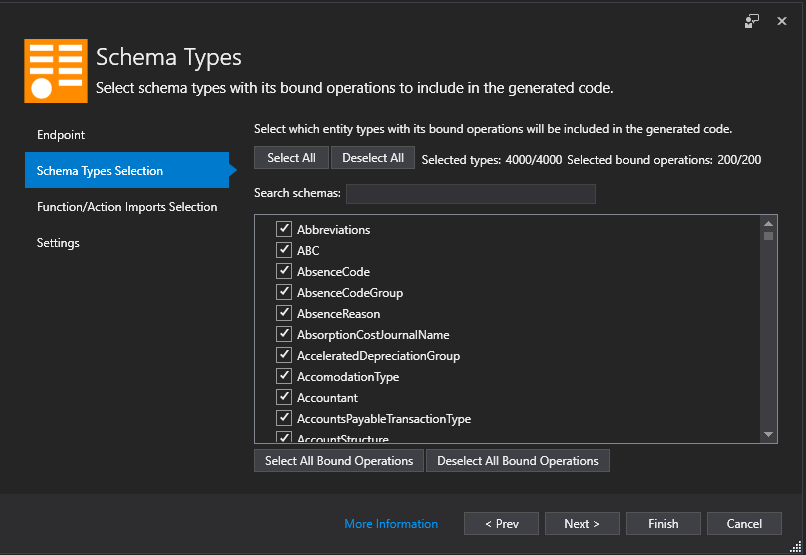
              ​​

              Once you click Finish, it will download the artefacts and create .cs file for each service we have in D365 Finance and Supply Chain. This process can take 10-30 min.

              6. Authenticating and calling the service

              Now that all our perquisites are complete, we can go ahead and write the actual API calls in our C# project. Refer below screenshot of code and I will try to explain its section below.
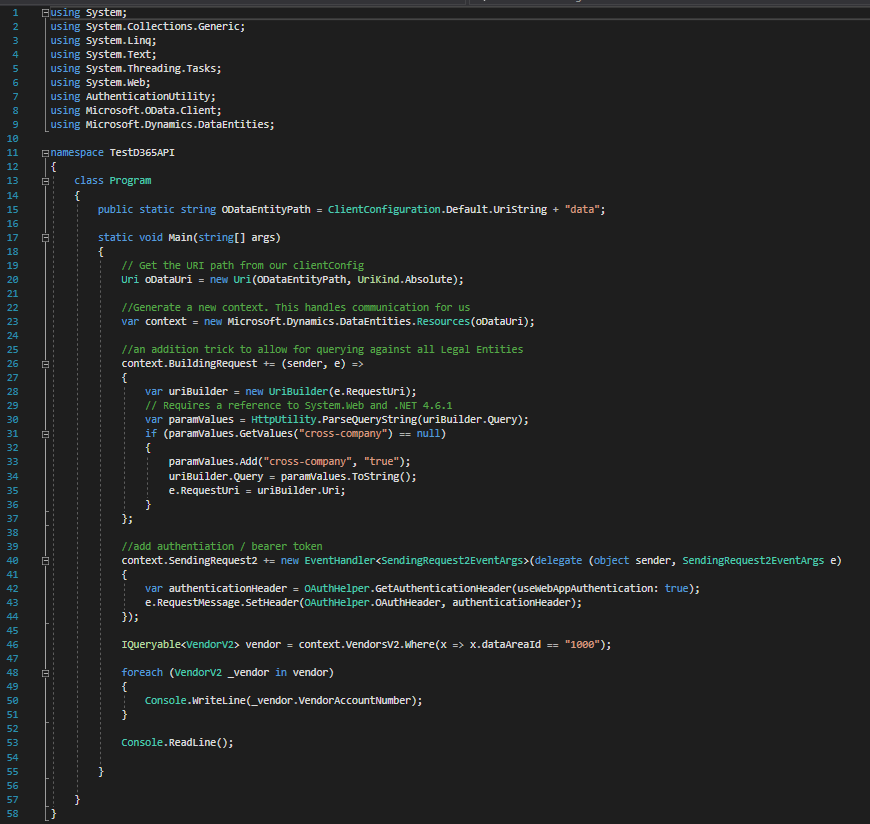
               

              Line#7 – Line#9: Providing references to relevant namespaces so that we can use the classes residing in those namespaces.

              Line#15: string declaration holding uri value

              Line#20 – Line#37: Creating Uri object so that we can set the context of the call. In this context we will set cross-company parameter are try so that we can fetch the data across the legal entities.

              Line#40 – Line#44: Creating and setting the header with values related to application id, application secret, tenant, etc. If we recollect, we have setup this earlier in Step 4. Here we are just calling that information and passing it to relevant classes.

              Line#46 – For this demonstration we will VendorV2 entity. We will try to fetch all the vendors for legal entity ‘1000’. You may choose any legal entity from available list from your D365 instance. We are declaring IQueryable object of VendorV2 entity as we will get multiple values and we need to loop on it. As you can see the statement is very much like how we write SQL statements i.e., a select statement, a where condition etc.

              Line#48 – Line#51: Actual for statement in which we loop on fetched records and print it on screen

              If you have done setup and written logic correctly console will display the fetched vendors id values.

              Summary

              Like every problem has multiple solutions, there are various ways to call D365 Finance and Supply Chain REST API. One can experiment and have its own suitable logic to consume the API. Also C# has various support for OData which makes life easier for developers to consume the API and use it.

              But if I tell you that Microsoft has given us a more advanced option where there is no need to write code to consume the API? Will it not be a wonderful thing where not only developers, but other business users also create their own app to consume the data from D365 Finance and Supply Chain via integration? Power Platform is the name where we can do such things.

              Stay tuned for my next blog where we explore the Microsoft Power Platform to integrate with Dynamics 365 Finance and  Dynamics 365 Supply Chain Management .

              Happy DAXing!!

              Let's Build Smarter, Agile, and Scalable Solutions Together
              Talk to An Expert
              Talk to An Expert Alletec
              Feb 01, 2021 8676 Views

              Recent Posts

              Turning Production Data into Predictive Performance: AI-Powered Shop Floor Intelligence with Microsoft Dynamics 365

              Jun 24, 2026

              Turning Production Data into Predictive Performance: AI-Powered Shop Floor Intelligence with Microsoft Dynamics 365
              Read Full Blog    
              From AI Ambition to AI Value - How Copilot and AI Capabilities in Microsoft Dynamics 365 Bridge the Gap

              May 14, 2026

              From AI Ambition to AI Value - How Copilot and AI Capabilities in Microsoft Dynamics 365 Bridge the Gap
              Read Full Blog    
              The Path to Mission Resilience: How Nonprofits Can Overcome the Operational Debt Limiting Impact

              Apr 9, 2026

              The Path to Mission Resilience: How Nonprofits Can Overcome the Operational Debt Limiting Impact
              Read Full Blog    

              Alletec blends deep Microsoft solutions expertise with industry knowledge and 25+ years of experience to catalyse digital transformation and amplify business outcomes for enterprises.

              FOLLOW US
              LATEST NEWS
              • Alletec recognized as 2025/26 Inner Circle Winner for Microsoft AI Business Solutions
              • From Copilot to Sustainability: Alletec to Lead Expert Discussions at Directions ASIA 2025
              • Alletec Strengthens North American Footprint with Major Microsoft Dynamics 365 Contact Center Win
              • Alletec Expands to the Middle East with a Subsidiary in Dubai
              • Alletec Named a Great Place to Work® for the Third Consecutive Year
              CONTACT US
              • India: A-1, Sector - 58 Noida - 201 301, India +91 120 3000 300

              • USA: 5605 North MacArthur Blvd., Ste 1000, Irving, Texas 75038 +1 469 767 9753

              • Kenya: The Westwood Vale Close Off Ring Road Westland +254 725 074 589

              • Canada: 181 Bay Street, #1800, Toronto, Ontario, M5J 2T9 +1 289 763 5998

              • United Arab Emirates: IFZA Business Park, DDP, PO Box 342001, Dubai +971 58 248 0169

              • info@alletec.com
              Quick Links
              • eBooks
              • Blogs
              • Case Studies
              • Brochures
              • Life At Alletec
              • Company Profile
              • Partner Program
              • Privacy Policy

              @ 2026 Alletec. All rights reserved.

              Chatbot IconAsk me anything